Guides
SEO for a new website: launch week and the first 90 days
Your business has a name, customers and a phone that rings. Here is how to make sure the new website keeps it ringing: what to check before it goes live, what to do in launch week, and what to expect from Google over the next three months.
· Updated · 6 min read

In this story
A new website for an established business is a strange thing. The business already has a name, years of customers and a phone that rings. The website, on the day it goes live, has none of that. To Google it is a stranger at a new address.
Google says as much. "It can take a few weeks for Google to notice a new site," its guide for site owners says, read on November 17, 2026. The same page says most owners "usually don't even need to do anything except post your site on the web," and then adds the line that matters: "However, sometimes sites get missed."
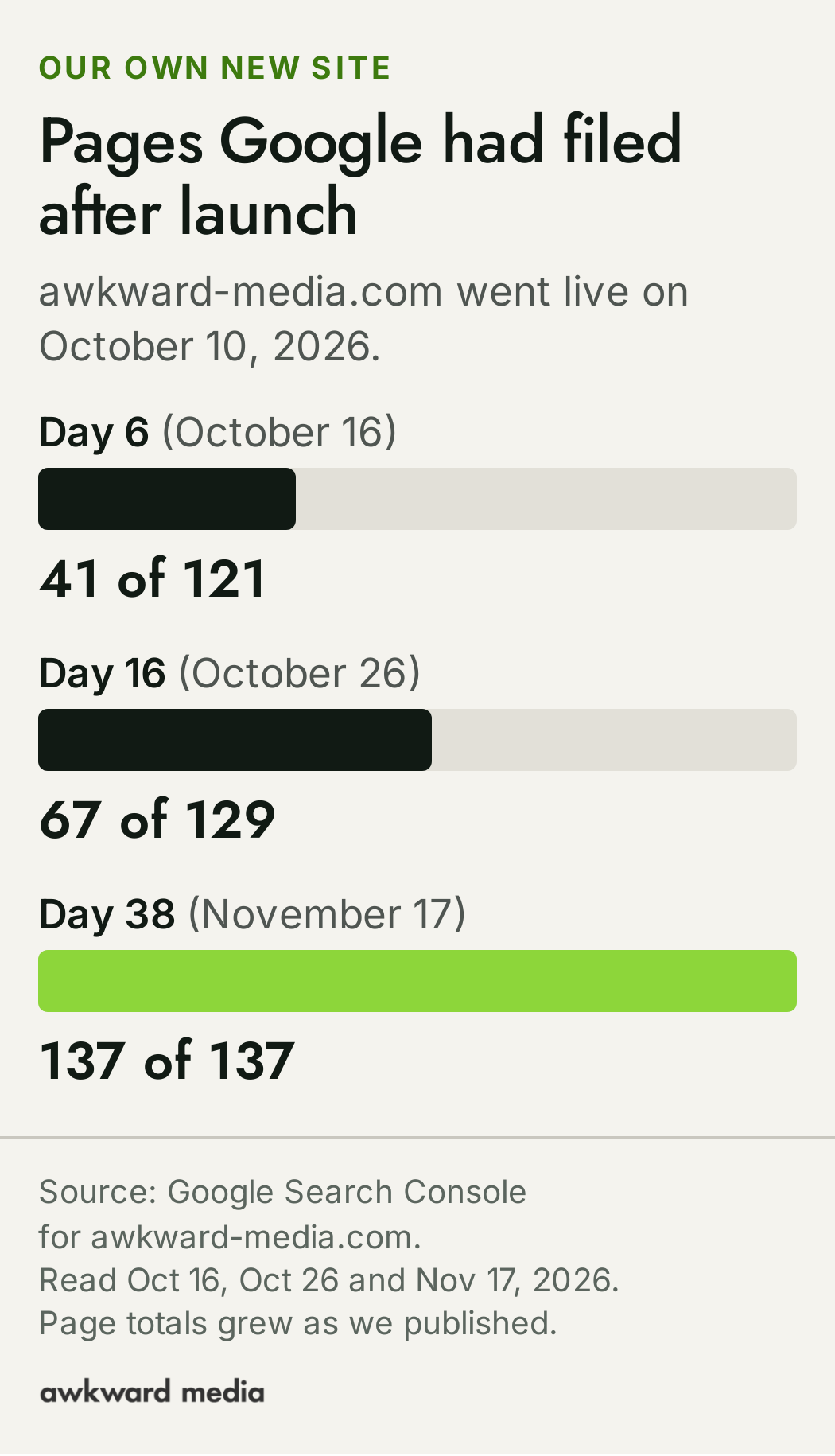
We know the feeling from the inside. When we put our own new website live on October 10, 2026, Google had filed 41 of its 121 pages six days later. By day 16 it was 67 of 129. By November 17, day 38, it was all 137. That's a good outcome, and it still meant more than a month before every page could be found.
This guide is for the owner who is about to go through that: a new build, a new web address or a new brand, for a business that already has customers to lose. It covers what to check before the site goes live, what to do in launch week, and what Google does with a new site over the first 90 days, in plain words, with lines you can send straight to whoever builds your website.
Who is this for, and what does it leave out?
This is for a business that is already trading and is putting up a website it hasn't had before. Three situations cover it:
- A new build. The old site was a single page, a template or out of date, and you're replacing it with a proper one.
- A new web address. You're moving from an old address to a new one, often because the old name was long, misspelled or tied to a former partner.
- A rebrand. New name, new look, new site, same team and same customers.
If you already have a website that Google shows, the riskiest part of the change is the old pages: every address that people and Google know has to forward to the right new page. We wrote that part up separately, with every number from our own switch, in what happened to our Google numbers when we rebuilt our site. If you'd rather hand it to someone, that's our website migration service. This guide picks up from there and stays with the new site itself.
What does Google do with a brand‑new website?
Three things have to happen before anyone can find a new page on Google, and it helps to have words for them.
- Google finds the page. It follows links from pages it already knows, or reads a list of pages you hand it.
- Google reads it and files it. Google keeps a giant catalogue of the pages it can show, called its index. A page that isn't filed there can't appear in a search, however good it is.
- Google decides where it fits. For every search, Google picks from the filed pages and puts them in order. That order is what people mean by ranking.
How long the first two take is the part owners ask about most. Google's help page for its free website tool, Search Console, gives the range: after a new page is posted, "the total time can be anywhere from a day or two to a few weeks, typically, depending on many factors." It also asks for patience after you hand over your list of pages: "allow at least a week after submitting a sitemap or a submit to index request before assuming a problem." (A sitemap is simply that list: one file that names every page on your site.)
The third step, ranking, takes longer. Google's own starter guide puts it this way: "Some changes might take effect in a few hours, others could take several months." Its advice is to "wait a few weeks to assess whether your work had beneficial effects."
None of that is a reason to wait and hope. What you do in the weeks around launch decides how quickly Google gets through those three steps, and which searches it files you under when it does.
What should be true before the site goes live?
Many launch problems are set up in the last week before launch, when everyone is rushing. These six are the ones worth checking, in order. You don't have to do any of them yourself. Each comes with a line you can copy and send to whoever builds your site.
1. Google isn't being told to stay out
While a site is being built, developers often hide it from Google on purpose, so half-finished pages don't show up in search. That's sensible. The trouble starts when the switch is left on after launch. The site looks perfect in a browser and stays invisible on Google, sometimes for weeks before anyone notices.
Send this to your web person: "Before we go live, please confirm the new site has no 'noindex' tag on any page we want found, that robots.txt doesn't block the site, and that there's no password on it. Then check the same three things again the day after launch."
2. Every service you sell has its own page
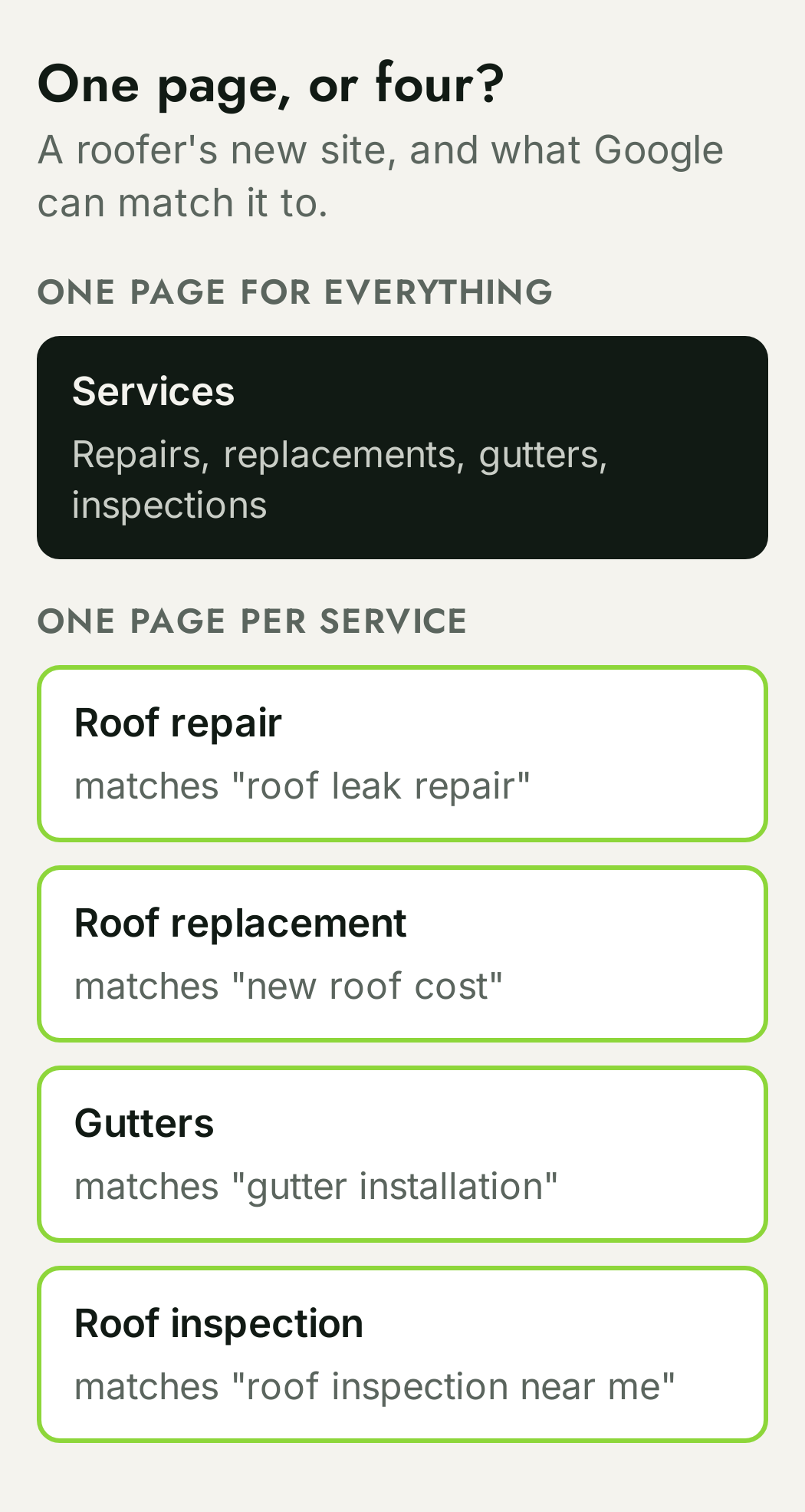
Google matches pages to searches. If a roofer's new site has one page called "Services" listing repairs, replacements, gutters and inspections, Google has one page to match against four quite different searches. Four pages, one for each, give it four clear answers. The same goes for the main towns you work in, when each one is a real market for you.
A rebuild is the cheapest moment to get this right, because the pages are being written anyway. It's the core of what we do on on-page SEO, and our SEO checklist for business owners walks through what each of those pages needs.
3. Each page's title says what and where
The title is the blue line people click on Google. On a new site it's often left as the page's menu name ("Services", "About") or the business name on every page. A title like "Roof Repair in Raleigh | Smith Roofing" tells both Google and the person searching exactly what's behind the click.
Send this to your web person: "Please send me a list of every page with its title and its short description (the grey text under the title on Google). I want each one to name the service and the town, and no two pages to have the same title."
4. Your name, address and phone match everywhere
If your business shows on Google Maps, it does so through a free listing called a Google Business Profile. Google's own help page on local results says they're "mainly based on relevance, distance, and popularity." A new site is a chance to make the basics agree: the business name, address and phone number on the site should be written exactly as they are on the profile. A rebrand makes this urgent, because the old name is still sitting on the profile and on every directory that lists you.
This is part of the everyday work in local SEO and Google Business Profile optimization.
5. Old addresses forward to new ones
If anything about your web address or your page addresses is changing, each old address needs to send visitors, and Google, to the matching new page. This is the step that decides whether the business keeps what its old site earned. It's long enough to deserve its own guide, so we've kept it in one: our own site switch, with every number, including the 19 old addresses people were still reaching that showed 'page not found' after launch. If you'd rather not run it yourself, see our website migration service.
6. Search Console is ready for the new address
Search Console is Google's free tool that shows which searches your site appears for, how often people click, and which pages Google has filed. Set it up for the new address before launch day, so the first day's numbers are there to compare against.
Send this to your web person: "Please add the new site to Google Search Console before launch and give me access as a Full user. If we're changing web address, keep the old address in Search Console too, so we can watch both."
What should happen in launch week?
Launch week is short and specific. Four jobs, most of them on the first day.
Day one: hand Google the list of pages
Your web person submits the sitemap in Search Console. It doesn't force anything, but it saves Google from finding every page one link at a time. On our own switch, the list went to Google on day one, and 41 of 121 pages were filed within six days.
Day one: point your Google profile at the new site
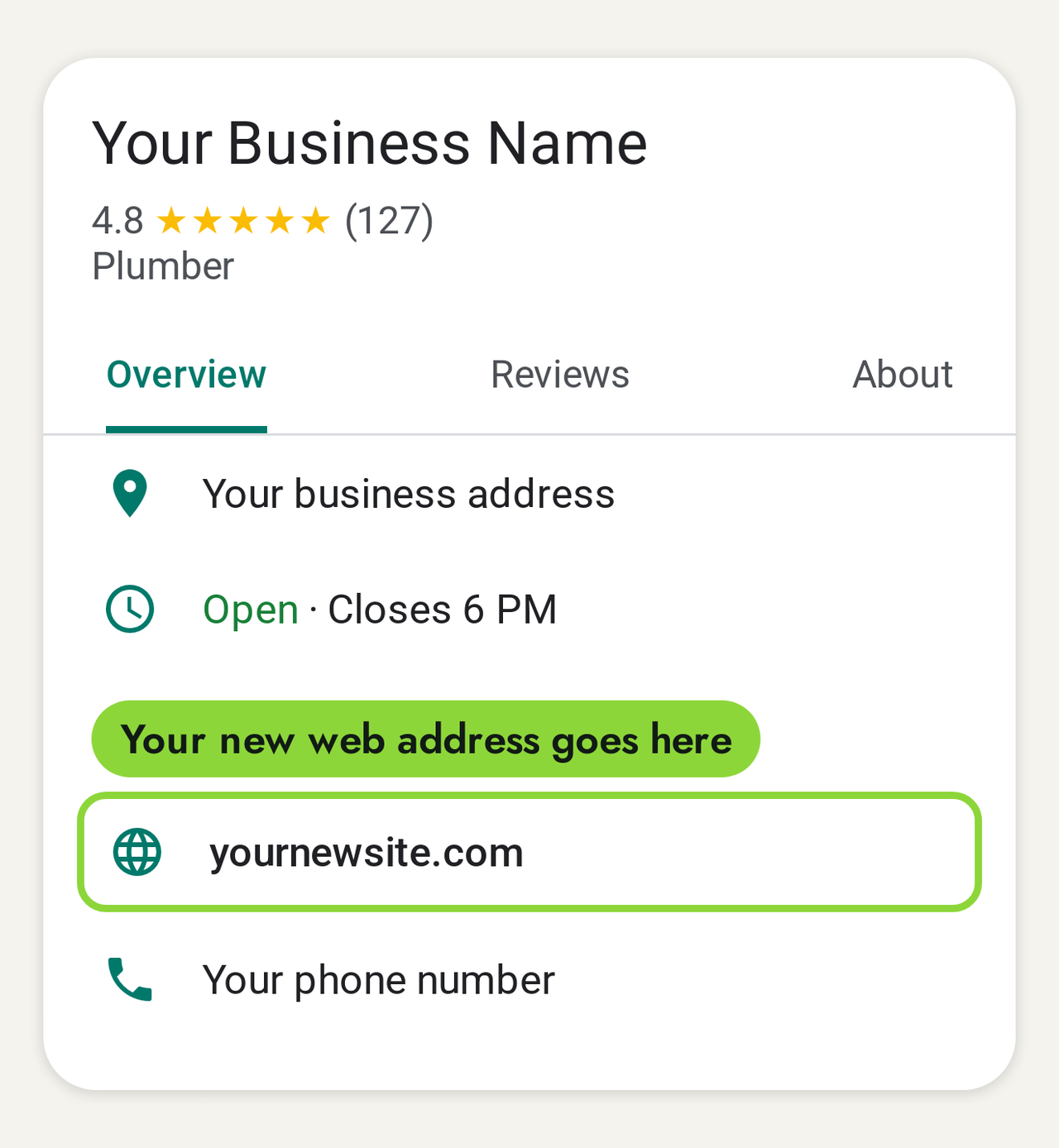
Your Google Business Profile shows a link to your website. If the address is changing, update it on launch day. It's how people who find you on the map reach your website, and an old or broken address there sends them nowhere.
Day two: search for yourself the way Google suggests
Type site: followed by your web address into Google, with no space: for example site:yourbusiness.com. Google's starter guide explains what you're looking at: "If you see results pointing to your site, you're in the index." On day two, seeing only a handful of pages, or none, is normal. The point is to have a starting number to compare against.
Days three to seven: fix the listings that carry your old details
For a new web address or a new name, the directories that list your business (Yelp, Bing, Apple Maps, trade associations, the local chamber) still point at the old details. Each one you correct points people, and Google, at the new site. Google's advice for a site that isn't showing up includes exactly this: "Wait a while, and try to get linked from other sites."
Weeks two to four: when should Google start showing the new site?
This is the stretch where owners get nervous, so it's worth knowing what normal looks like.
Pages get filed in batches, not all at once, and some take much longer than others. On our own site, a page we published on October 20 was filed the next day, while five articles from October 12 still hadn't been visited eleven days after Google got the list.
The number to watch in these weeks is pages filed, not visitors. Before Google has filed a page, it can't show it for anything. Once it has, the searches start to arrive, often in small numbers at first and often for searches you didn't expect.
When to worry, and what to ask:
- The filed count hasn't moved in two weeks. Ask your web person to check the "keep out" switches from step 1 again.
- Search Console lists pages as "Not found (404)". These are usually old addresses that nobody forwarded. Each one is a visitor landing on an error.
- Google shows the old business name. The old name is still somewhere Google reads: the page titles, the profile, or the directories.
Months two and three: how does a new site go from showing up to being picked?
Being filed means you can be found. Being picked, high enough on the page that people click, is the next job, and it's where the real work of SEO lives. On a new site, three things move it most.
Pages that answer what your customers search
Every service page you wrote before launch is a start. The next layer is the questions customers ask before they call: whether they need it at all, and what it costs. A business that answers those plainly gives Google more reasons to show it, and gives the reader more reasons to trust it. That's what SEO content writing is for.
Other sites that mention and link to you
Google's line to site owners is short: "try to get linked from other sites." For an established business, many of those links already exist. They just point at the old address or the old name. Getting them updated is quick, and new ones from local and trade sites add to them. Our link building work runs on the same idea.
The site and the map working together
For a business that serves a local area, the website and the Google Business Profile lean on each other. The profile links to the site, the site confirms what the profile says, and the service pages give Google the detail it needs to match the business to searches. We've written up how the map side works in how to rank higher on Google Maps.
The same groundwork now pays off in more places than Google's blue links. AI assistants such as ChatGPT and Google's AI answers also recommend businesses, and they draw on what's written about you across the web. In our study of 200 local searches, the business an AI assistant picked first was in Google's Maps top three for only 53 of 792 answers. Being clear about what you do and where, on your own site and on the sites that mention you, is how a new site gives both of them something to work with. Our AI search optimization page covers that side.
How do you know the new site is working?
You don't need to learn any tools. Three numbers, read once a month, tell the story:
- Pages filed. It should climb in the first weeks and then match the number of pages on your site.
- How often Google shows you. Search Console calls each appearance an "impression". It moves before clicks and calls do.
- Clicks from Google. The people who chose you from the results.
Send this to your web person: "Once a month, please send me three numbers from Google Search Console for the last 28 days against the 28 days before: total impressions, total clicks, and the number of pages listed as indexed. A screenshot is fine."
If you're switching from an old site, compare the same length of time before and after the switch, as we did in our own write-up. And if you'd like a sense of how long the whole climb usually takes, we've answered that in how long SEO takes.
Should you do this yourself, or bring someone in?
The launch-week list above is something a careful owner and a good web person can do together. What takes longer is the months after: choosing the searches worth winning, writing the pages for them, earning the links, and keeping the map profile and the site in step. That's ongoing work, and it's what decides how far the new site climbs.
If you want it done for you, here's what it costs, from our pricing page: Google Maps starts at $1,497 a month. Google rankings start at $2,697 a month. Both go up for multiple locations, multiple websites and complexity.
And the promise behind it: Page one in 60 days, or we work free.
This is for businesses already doing $20k a month or more. If that's you, and a new site is on the way or just went live, it's a good moment to talk, before Google files the new site and settles where it fits. We look at the site with you and tell you what we'd do first. See our SEO services, our technical SEO work, or book a call.
Every fact in this story is linked to its source. Spot something out of date? Tell the editor and we will correct it.
Questions readers ask
Frequently asked questions
How long does it take for a new website to show up on Google?
Google's help page for site owners says a new page typically takes "anywhere from a day or two to a few weeks" to be found and filed. On our own new site, Google had filed 41 of 121 pages after six days, 67 of 129 after 16 days, and all 137 by November 17, 2026, 38 days after launch. Ranking well for the searches that bring work takes longer than being filed.
Do I need to submit my new website to Google?
Not strictly. Google says owners "usually don't even need to do anything except post your site on the web", and also that "sometimes sites get missed." Handing Google your list of pages through its free Search Console tool on launch day costs nothing and takes minutes, so it's worth doing.
How do I check if Google has found my new site?
Type site: followed by your web address into Google, with no space, for example site:yourbusiness.com. Google's own guide says: "If you see results pointing to your site, you're in the index." For an exact count, ask your web person for the number of indexed pages in Search Console.
We're rebranding. What's the first thing to change?
The places customers and Google already read your details: your Google Business Profile (name and website link), the page titles on the new site, and the directories that list you. If your web address is changing too, every old address needs to forward to its new page. We cover that step in our own site switch write-up.
Can ChatGPT do SEO for a new website?
It can help draft pages and titles, and someone who knows your trade should check every line for accuracy. What it can't do on its own is the work that decides where you rank: choosing the searches worth winning, earning links from other sites, keeping your Google profile and site in step, and reading the results each month.
About the author