Case study
Website redesign SEO: we moved our own site, and Google showed us 51% more
We moved our own website in October. Google showed us 51% more often in the two weeks after. Every number, what worked and what slipped.
· Updated · 6 min read

In this story
A website redesign is supposed to cost you at the start. Google says as much in its own guide to moving a site: "Expect temporary fluctuation in site ranking during the move." Every owner who has paid for a new website knows the fear: the new site goes up, looks better than the old one, and the phone goes quiet.
On Saturday, October 10, 2026, we rebuilt and moved our own website, awkward-media.com. That afternoon, at 1:48 Toronto time, Google was handed the list of every page on the new site. Then we watched Google's own numbers every day.
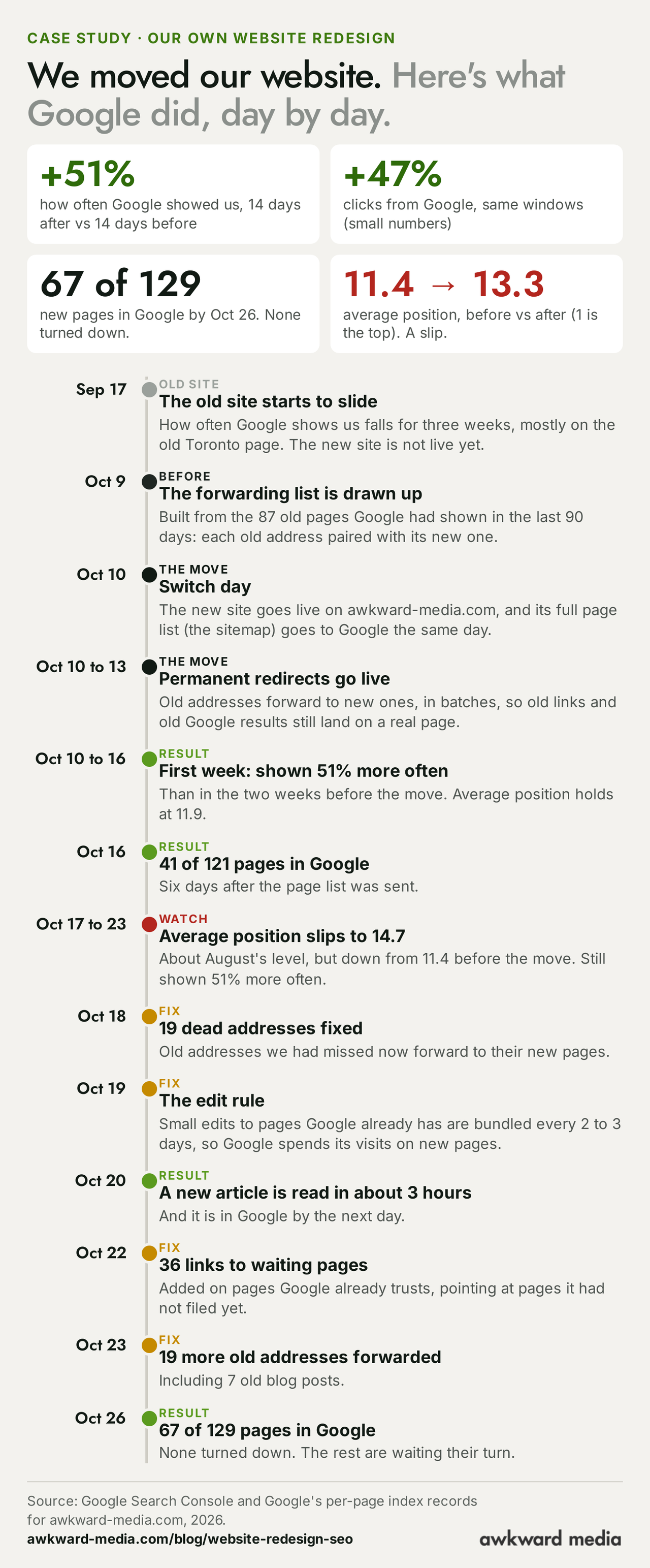
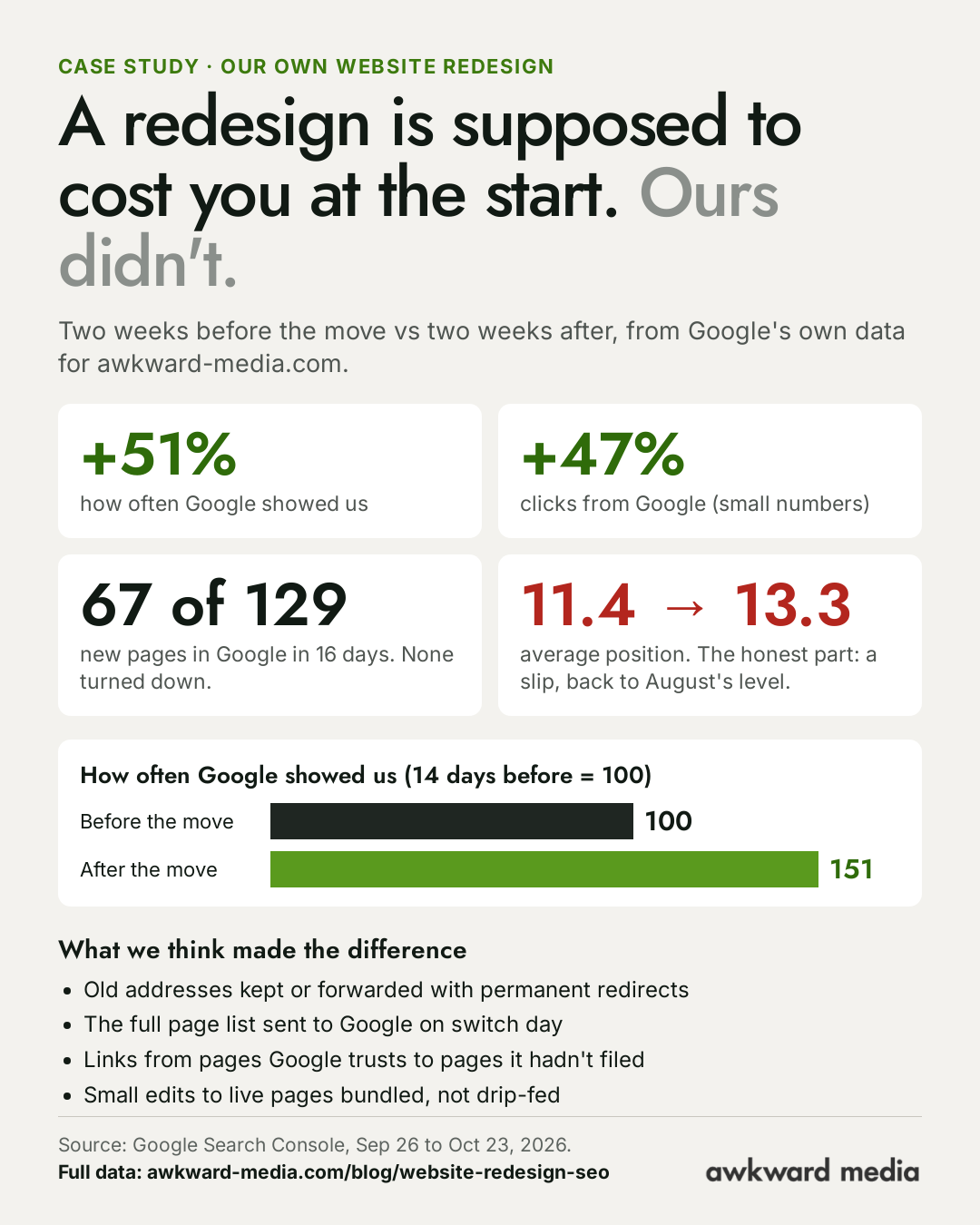
Here is what they show. In the two weeks after the move, Google showed our website 51% more often than in the two weeks before it. Clicks from Google rose 47%. By October 26, 67 of the new site's 129 pages were already in Google's index, and Google had turned down none of them.
That's the headline. It isn't the whole story, and we'd rather you heard the rest from us. Our average position in Google's results slipped after the move. We're still shown less often than in August. And we made mistakes along the way, which we caught and fixed. All of it is below, with every number, every date and the reasons we think it went the way it did. If you're planning a new website, this is the closest thing to a test run you'll get without paying for one. It's written for owners, not for web developers, in the same plain words as our local SEO guide for small business.
The short answer: does a website redesign hurt SEO?
SEO, short for search engine optimisation, is the work of getting your business to show up when people search for what you do. A redesign doesn't have to hurt it. What hurts is what usually travels with a redesign:
- Pages change address and nobody tells Google. Every link and every Google result pointing at the old address leads to "page not found".
- Pages that brought customers get deleted or merged because they didn't fit the new design.
- The words that earned the rankings get rewritten by someone thinking about looks, not searches.
- The new site stays hidden. Designers often switch on a "do not show in Google" setting while they build, and forget to switch it off.
- Google simply needs time. It has to find, read and file every page again. By Google's own estimates a site move typically takes 1 to 3 months to settle.
Avoid the first four and you're left with the fifth, which is a wait, not a loss. In our case the wait came with a rise. The rest of this article shows how, and where it didn't go our way.
Our move in numbers: before and after
Every figure here comes from Google Search Console, the free tool where Google reports how often it shows a website and how often people click, and from Google's own record of which pages it has filed. To keep the comparison fair we use two windows of the same length: the 14 days before the move (September 26 to October 9, the old site) and the 14 days after it (October 10 to 23, the new site). October 24 and 25 were still being counted when we wrote this, so they're left out.
| What we measured | 14 days before the move | 14 days after the move | Change |
|---|---|---|---|
| How often Google showed us (index, before = 100) | 100 | 151 | +51% |
| Clicks from Google (index, before = 100) | 100 | 147 | +47% |
| Average position (1 is the top) | 11.4 | 13.3 | 1.9 places lower |
| New-site pages in Google's index | Not yet live | 67 of 129 by Oct 26 | None turned down |
We show Google's counts as an index rather than raw totals. An index simply sets the "before" period to 100, so 151 means half as much again. It's the same arithmetic as the raw numbers, and it's what matters for the question at hand: did the move cost us?
How often Google showed us: up 51%
Google counts an "impression" every time your website appears in someone's search results, whether or not they click. It's the earliest sign of whether Google trusts your pages, because it moves before clicks and calls do.
Look at the chart below and you'll see something that matters more than the 51%: the slide started on the old site, on September 17, three weeks before we moved. Nearly all of that fall landed on a single old address, our old Toronto page. By the time we switched, the old site was being shown about half as often as in August. The new site turned that around in its first days and has held there since. The first week after the move and the second came in at the same level, 151 against the old site's last two weeks.
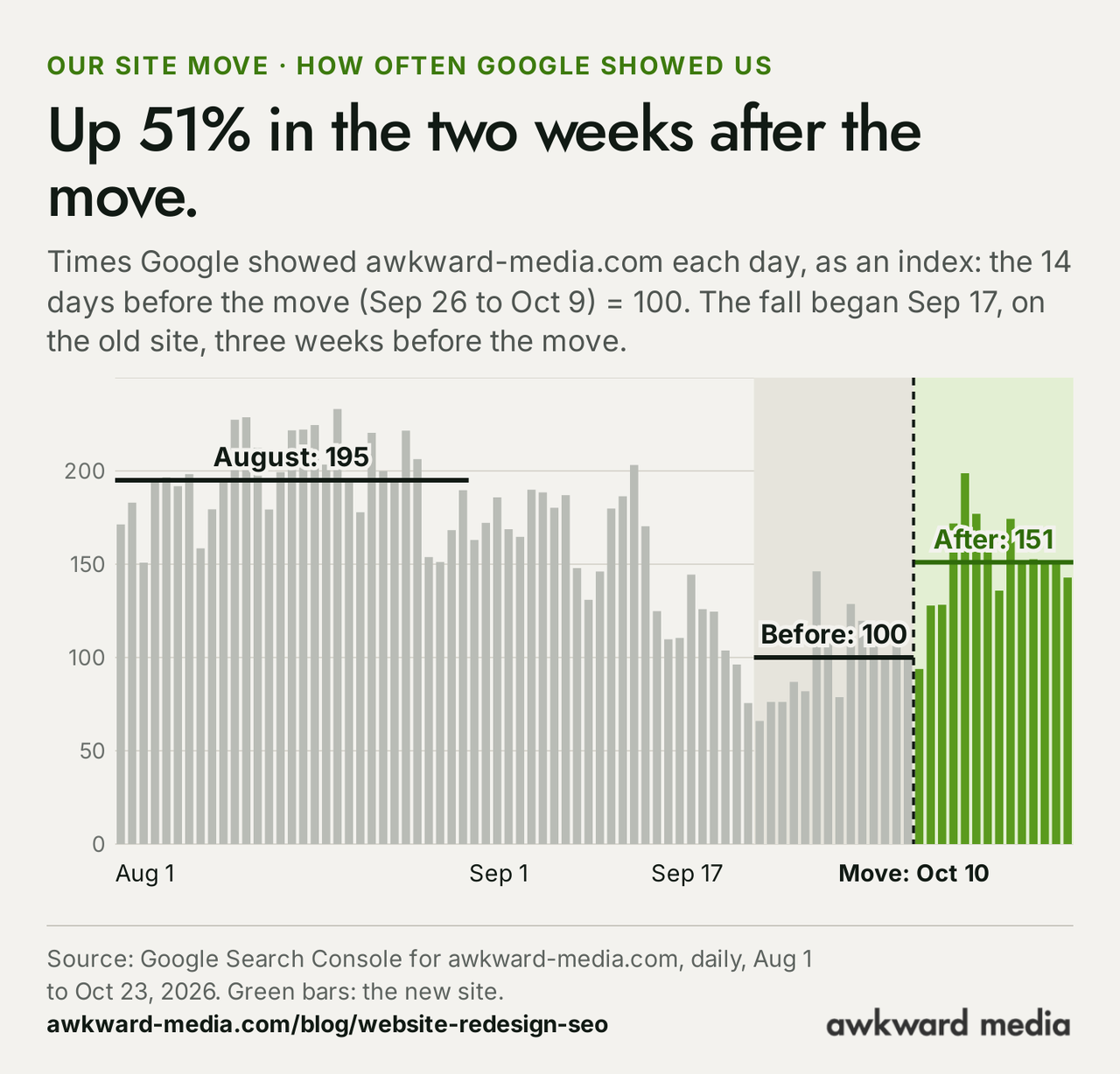
We're not back to August. In the two weeks after the move, Google showed us about 23% less often than it did across August. A redesign that "caused no drop" and a website that has fully recovered are two different claims, and only the first is true today.
Clicks from Google: up 47%, on small numbers
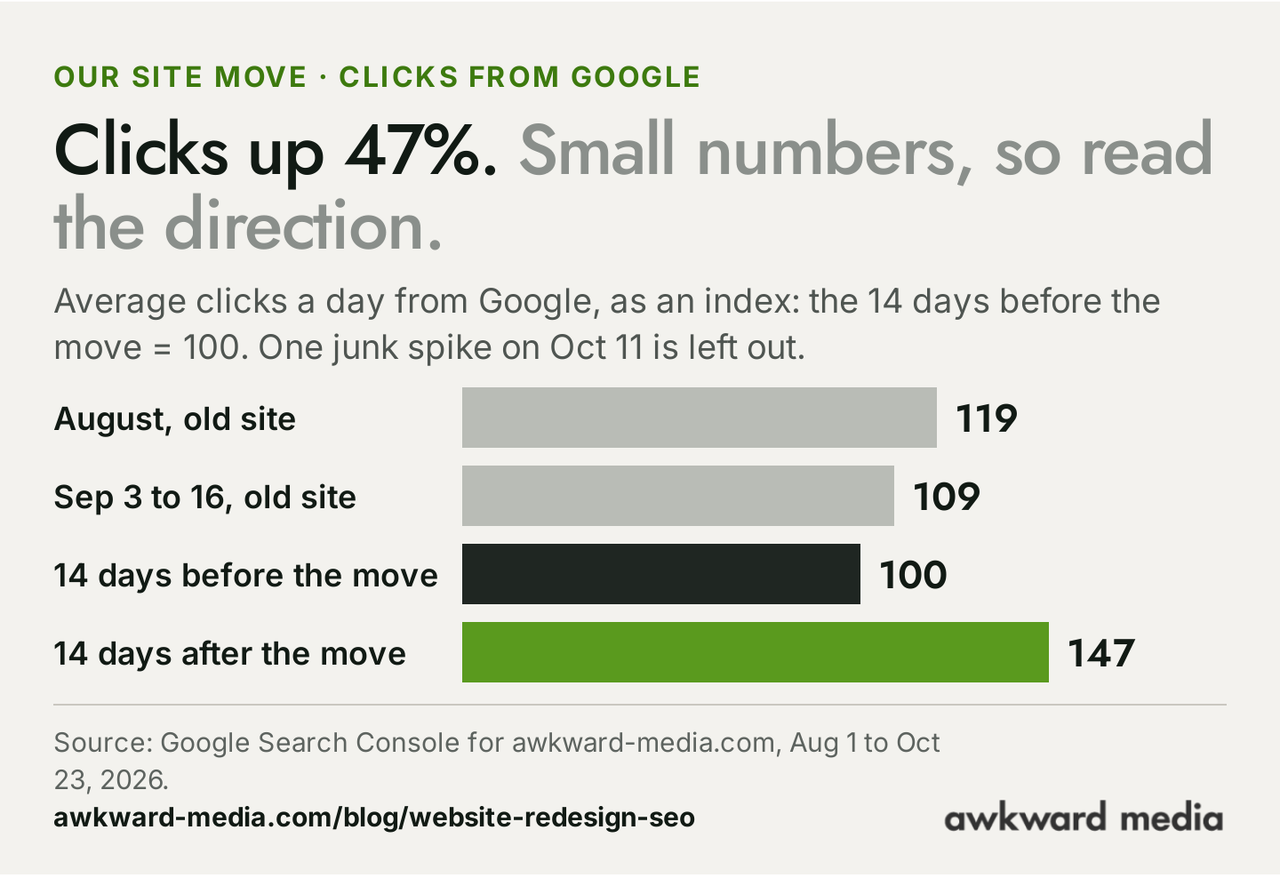
Clicks rose 47% between the same two windows. We'll be straight about what that's worth: our clicks from regular Google results are a small daily number, small enough that one busy day moves the average. One day, October 11, had a spike out of line with every other day on record, so we left it out of the comparison. Read the direction, not the decimal.
Pages in Google: 67 of 129, none turned down
A page only shows up in search once Google has read it and filed it in its index, the giant catalogue it searches when someone types a query. Six days after we handed Google the new site's page list, 41 of 121 pages were filed. By October 26, 67 of 129 were. The total keeps rising because we keep publishing.
The number that matters most is the one that isn't there: zero pages turned down. Of the 62 pages still outside the index on October 26, 50 were known to Google but not yet read, 11 hadn't been found yet, and one was a duplicate address of our terms page, where Google kept the copy with a slash on the end. Nothing was read and rejected. That's a queue, not a verdict.
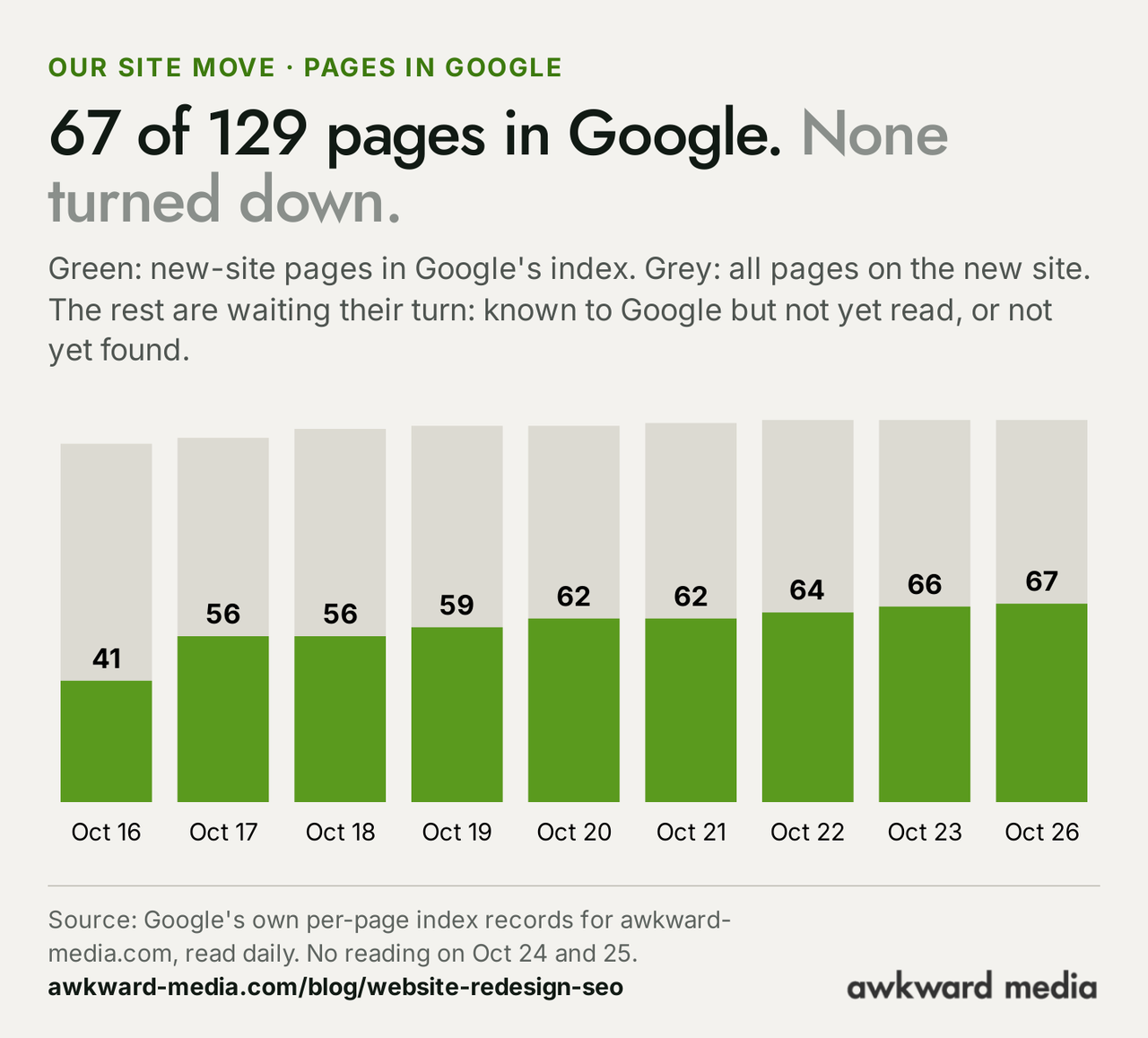
The pace tells its own story. The first big jump came in the first week, then growth slowed to one to three pages a day from October 19. The fastest page we timed was a brand-new article, which Google read about three hours after it went live on October 20 and had filed by the next day. The slowest were five articles dated October 12 that Google knew about but still hadn't visited eleven days after it got the page list. If you've read our piece on how long SEO takes, you'll recognise both ends of Google's own estimates in those two examples.
Where we rank on average: it slipped, and here's why
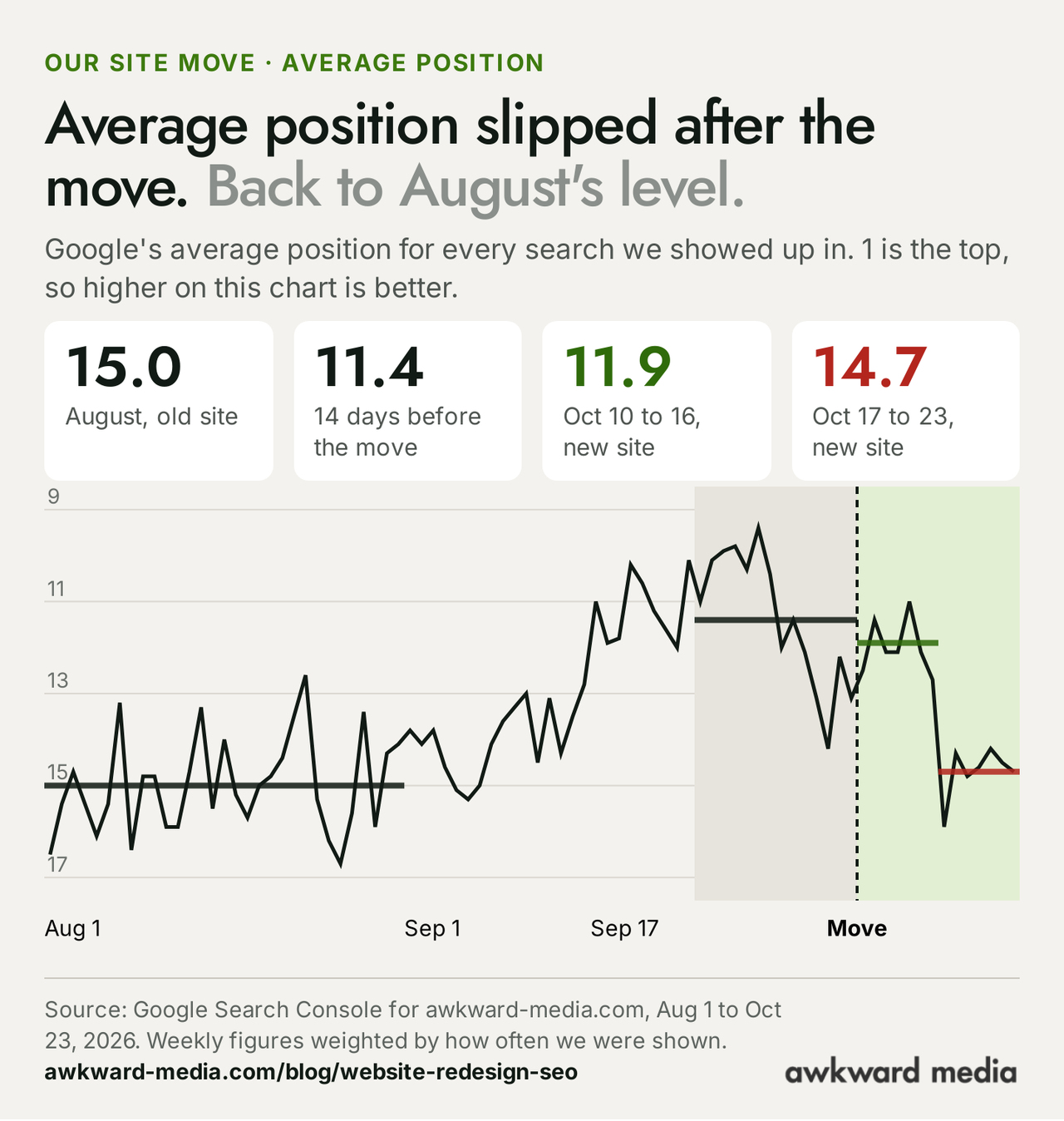
Average position is where your pages sit in Google's results, averaged across every search you show up for. Position 1 is the top; page one ends around position 10. In the 14 days before the move ours averaged 11.4. In the first week on the new site it held at 11.9. In the second week, October 17 to 23, it fell to 14.7.
Two things are worth knowing before you read that as bad news.
First, an average position moves when the mix of searches changes, not only when rankings do. Picture a shop that sells only its best-seller for a month: its average review score looks superb. Put the full range back on the shelves and the average dips, even though nothing got worse. In late September the old site was being shown for far fewer searches, which flattered its average. The new site is shown for more searches, and new pages usually enter lower down before they settle. More searches, a lower average. That's our SEO team's reading of the data, not a certainty.
Second, 14.7 is about where we averaged across August, at 15.0, when the old site was healthy. So this is a slip from a flattering September, not a crash. It is still a slip, and we're treating it as one. Our best reading so far, and it's no more than that, is that one broad national search was sending people to our Toronto page instead of our home page. That fix is with our web team. We'll report whether it worked.
The move, day by day
Here is the same story as a diary. The dates are when things happened; the numbers are Google's.
September 17: the old site starts to slide
Three weeks before the move, the old site began to be shown less often, almost all of it on the old Toronto page address. We can tell you where the fall happened. We can't tell you for certain why, and we won't guess in print. What matters for this story is the timing: the slide began on the old site, before a single new page was live.
October 9: the forwarding list
The night before the switch, the team built a forwarding list from the 87 old pages Google had shown in the previous 90 days, according to Search Console. Each old address was paired with the new page that does the same job. Many rebuilt pages kept their old address. Where the new site's structure needed a new one, the old address was set to forward.
October 10: switch day
The new site went live on awkward-media.com, on the same domain. That afternoon the new sitemap, a simple file listing every page you want Google to know about, was sent to Google through Search Console. Google's guide says plainly that "submitting a sitemap can help make the discovery process quicker."
October 10 to 13: permanent redirects go live
The forwarding rules, known as permanent or "301" redirects, went live in batches over the first three days, starting with the old main-site addresses and finishing with old campaign pages on October 13.
October 10 to 16: the first week
Google showed us 51% more often than in the two weeks before the move, and average position held at 11.9. If a redesign was going to hurt, this is the week it usually shows.
October 16: 41 of 121 pages filed
Six days after Google received the page list, a third of the new site was in its index.
October 17: the position slip begins
Average position fell to 14.7 for the week to October 23, while how often we were shown stayed level. More on that above.
October 18: 19 dead addresses fixed
Checking which old addresses people and other sites were still reaching turned up 19 that showed "page not found", ones the first list had missed. Each was forwarded to its matching live page.
October 19: the edit rule
We agreed a rule that sounds dull and turned out to matter: small edits to pages Google already had (a new link here, a wording change there) would be saved up and shipped together every two to three days instead of one by one. Full rebuilds of pages carried on at normal pace. The reason is below.
October 20 to 22: links to the waiting pages
A new article was read by Google about three hours after it went live and was filed by the next day. On October 22 we added 36 links on pages Google already trusts, pointing at pages it hadn't filed yet.
October 23: 19 more old addresses forwarded
Another check found 19 more old addresses Google was still asking for, seven of them old blog posts. All 19 now forward to the matching live page.
October 26: 67 of 129
Day 16. More than half the new site filed, nothing turned down, and Google still showing us 51% more often than before the move.

Why redesigns lose rankings at the start
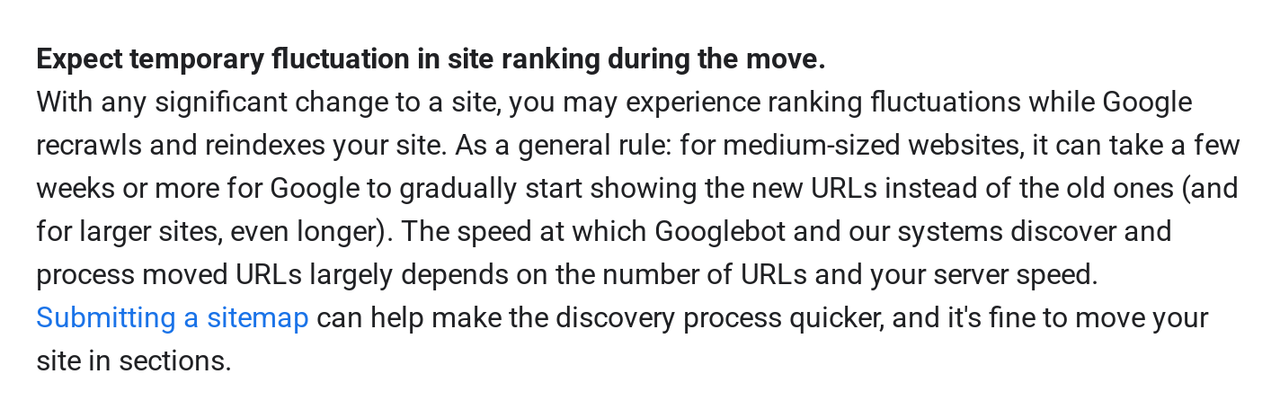
Google is frank about it. Its guide to moving a site with URL changes, last updated August 20, 2026, tells owners to expect rankings to wobble, and says that for a medium-sized website "it can take a few weeks or more" for Google to start showing the new addresses instead of the old ones.
That wobble is the cost every move pays. The bigger losses come from five avoidable mistakes.
1. Old addresses lead nowhere
Your pages have built up trust under their addresses: links from other websites, your Google Business Profile, old emails, Google's own results. Change an address without forwarding the old one and all of that leads to "page not found". Google's guide asks for permanent redirects from every old address to its new one, and for keeping them "generally at least 1 year".
2. Pages that earned rankings disappear
A designer trims the menu, the old "drain cleaning" page doesn't fit the new layout, and it's gone. So is every search it ranked for. Before a redesign, the list of pages Google actually shows for you is worth more than any mood board.
3. The words that ranked get rewritten for looks
A page ranks partly because of what it says. Replace a detailed service page with three lines and a big photo and Google has less reason to show it. A redesign is a chance to make pages better, which usually means more useful detail, not less. That's the core of on-page SEO and SEO content writing, and it carries straight over to a new design.
4. The new site stays hidden from Google
While a site is being built, designers often tell Google not to list it, using a setting called "noindex" or a block in a file called robots.txt. Google's guide to changing hosting lists removing those blocks as the first step of the move itself. Forget, and your shiny new site is invisible.
5. Google takes its time, and owners panic
Google typically comes back to a page it already knows about every 30 days, by the estimates Gary Illyes of Google showed in Barcelona this October. A new website asks Google to re-read everything at once. Owners who judge the redesign after a week, and start rewriting pages again, reset the clock on themselves.
What we did differently: seven decisions
We can't prove which of these made the difference. A website move isn't a lab test, and we only have one of ours. But each one is either something Google's own guides recommend or something our numbers support, and together they're the reason we think the move went the way it did.
1. We kept old addresses wherever we could
The cheapest redirect is the one you never need. Many rebuilt pages kept their old address exactly, so for those pages Google saw a better version of a page it already knew, at the same place.
2. We forwarded the rest, page by page
Where an address had to change, the old one was set to forward permanently to the new page that does the same job. Not to the home page, which Google can treat as a dead end, but to the matching page. Here are real rows from our list, checked live as we wrote this:
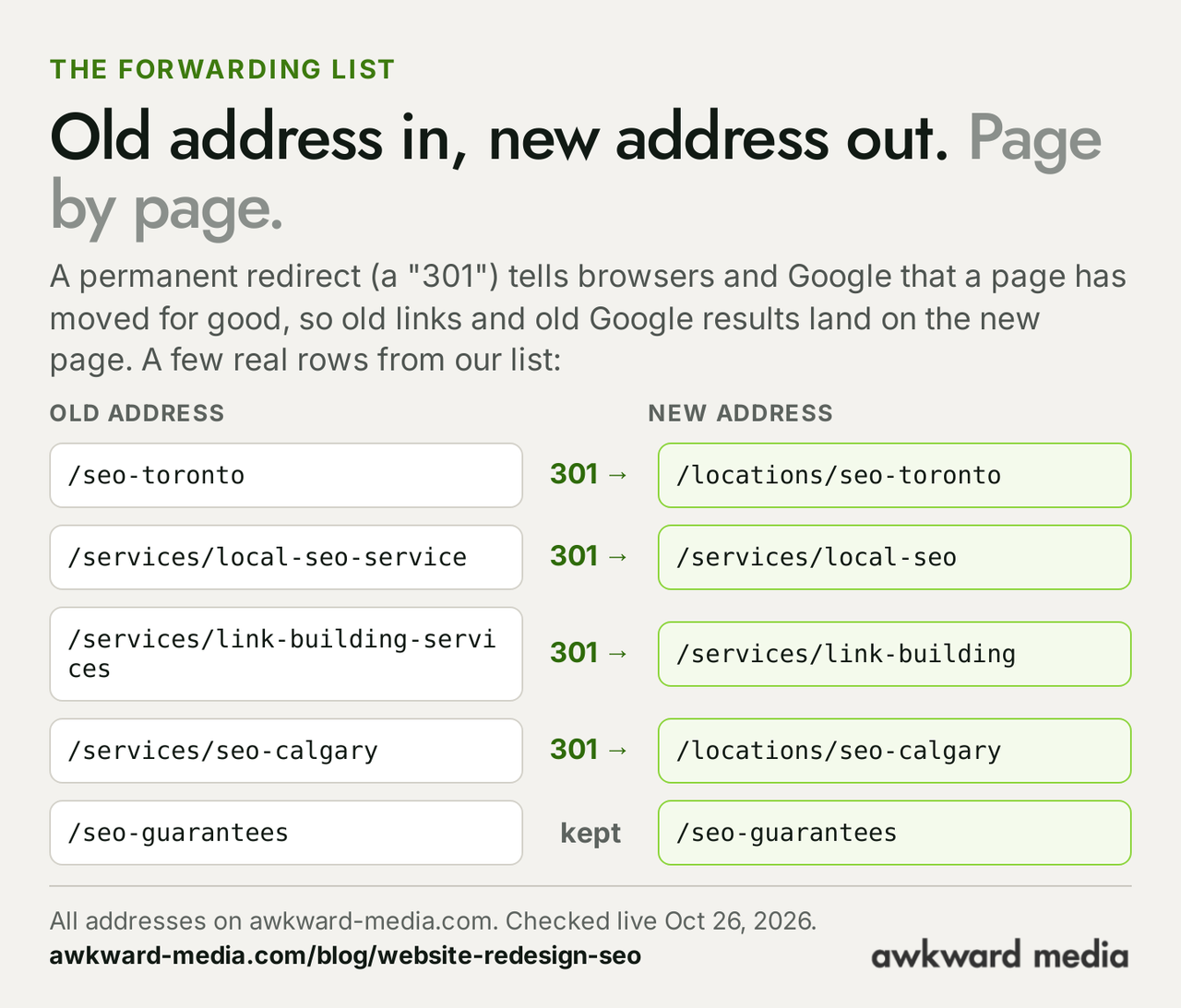
The Toronto row is the one that mattered most to us. That page is now our Toronto SEO page, and the old address forwards there. The same pattern took our city pages, such as Calgary, into one locations section, and service pages like local SEO and link building onto shorter addresses.
3. We started from what Google was showing, not from the old menu
The forwarding list was built from Search Console: the 87 old pages Google had shown in the previous 90 days. A page you've forgotten about can still be the one bringing in calls, and Search Console is where you find out.
4. We handed Google the new page list on day one
The sitemap went to Google on switch day. Google's guide says it "can help make the discovery process quicker", and the first-week numbers fit that: 41 of 121 pages filed within six days.
5. We linked new pages from pages Google already trusts
Google finds pages by following links. A page linked from your home page or a busy service page gets found and read sooner than one buried three clicks deep. So after the move we added links on pages Google had already filed, pointing at pages it hadn't: 36 of them in one round on October 22. Good internal linking is part of technical SEO; on a new site, it's also how you tell Google where to look next. Links from other websites matter too, which is the job of off-page SEO, and a move is the moment to make sure the best of them still land on a live page.
6. We stopped poking the pages Google already had
This is the one most people get backwards. After a launch, the instinct is to keep tweaking: a word here, a link there, every day. But Google only reads so many pages of a site each day, and it was spending most of its visits on ours re-reading pages it already knew. The crawl report in Search Console showed 93% of Google's visits going to addresses it had seen before, and only 7% to finding new ones. Every small edit to a filed page marks it as changed and invites another re-read, which is a visit not spent on a page still waiting. So from October 19 small edits were saved up and shipped together every two to three days. New pages carried on at normal pace.
7. We gave Google more worth showing
The new site has 35 location pages, 20 service pages, 19 industry pages, 16 case studies and, since the move, 11 new long-form articles. More useful pages means more searches you can be shown for. That's part of why Google showed us 51% more often, and, as explained above, part of why our average position dipped. Both are what you'd expect from a site that grew.
What went wrong, and how we fixed it
A case study that only lists what worked isn't worth much to someone planning their own move. These are the parts we'd do differently, because they're the parts most likely to catch you too.
The redirects went live over three days, not in one moment
Ideally every forwarding rule switches on at the same instant as the new site. Ours went live in batches between October 10 and 13. For a short window some old addresses showed "page not found". Given the numbers, it didn't cost us visibly, but on a site that leans on a handful of pages it could have.
Old addresses we missed
Two later checks found 38 old addresses Google was still asking for that had no forwarding rule: 19 on October 18 and 19 on October 23, seven of them old blog posts. The fix took minutes once we looked. The lesson is to look every day for the first weeks, not once.
A menu change that sent Google back to every page
On October 21, after a change to the site's menu and footer (the parts that appear on every page), our sitemap marked 99 of its 119 pages as updated on the same day. To Google that reads as "come back and re-read everything", the opposite of what a site waiting on new pages needs. Since then we've kept site-wide changes on hold while the new pages are still being filed.
Average position slipped
We covered it above, and we're not done with it. The fix we think matters most is pointing one broad national search at the right page. We'll know within weeks whether we read it right.
How long a website move takes, by Google's own numbers
On October 2, 2026, at Google's Search Central Live event in Barcelona, Gary Illyes of Google's Search team showed slides estimating how long 23 of Google's jobs take. Moving a whole site: typically 1 to 3 months to settle, and 6 months to over a year at the slowest. A small site move, by the same account, "can be done in a few weeks". We set those figures beside Google's written guide and our own move below.
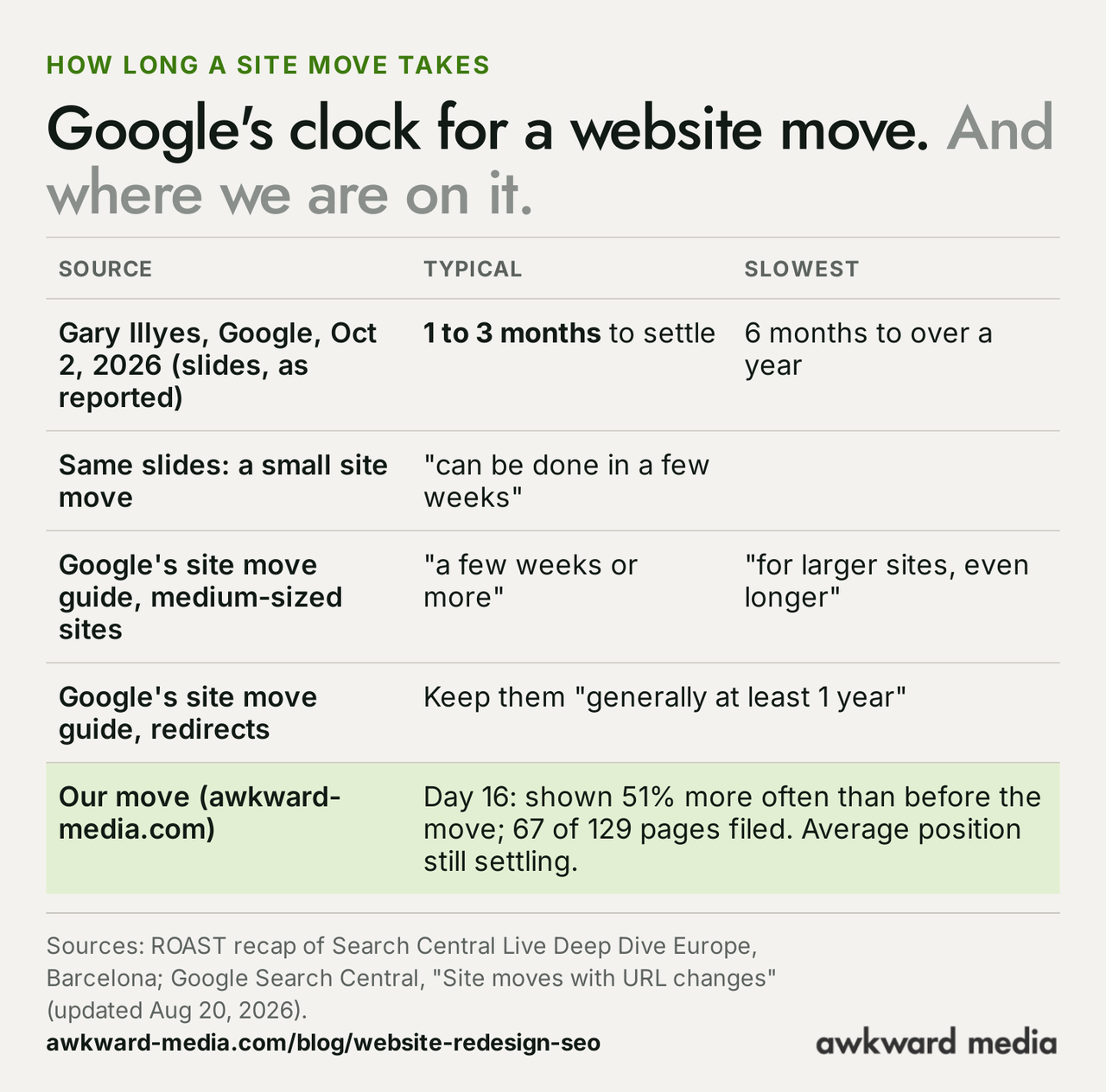
By that clock we're early. Sixteen days in, the part of the move that usually hurts most, the first two weeks, is behind us without a dip in how often Google shows us. The part that takes longest, Google settling on where each new page ranks, is still going on. That's why our average position is the number we're watching, and why we'll publish the next reading rather than declare victory now.
The slides came to us through attendees, not a Google document: John Campbell of the agency ROAST published the fullest record, and the trade press, including Search Engine Journal, reported it. We covered all 23 timings, typical and slowest, in How long does SEO take? Google's own timelines.
Website redesign or website migration: what's the difference?
People use the words loosely, and so does the trade. Here's how they differ in Google's eyes:
| Change | What it means | What Google has to do |
|---|---|---|
| Redesign only | New look, same pages, same addresses, same host | Re-read pages as it normally would |
| New platform or host | Site rebuilt on new software or servers, addresses unchanged | Adjust how hard it reads the site; Google says crawling can dip briefly, then rise |
| Site move with new addresses | Some or all page addresses change | Follow every redirect and move its trust to the new pages: Google's "site move" |
| New domain | The whole site moves to a new name | The full site move, every page, plus updating every outside link you can |
Ours was the second and third together: a full rebuild on new software, on the same domain, with many addresses kept and some changed. Google's guide on changing hosting notes that "it's normal to see a temporary drop in Googlebot's crawl rate immediately after the launch, followed by a steady increase over the next few days." Most small business redesigns land in the same place, because a designer rebuilding a site almost always tidies up some addresses. That's why we treat a website migration as its own job, with its own checklist, rather than something the designer sorts out on launch day.
Your website redesign SEO checklist
This is the list we'd hand anyone about to replace their website. It's built from Google's two site move guides and from what we learned on our own move, including the mistakes above. You don't need to do these yourself; you need to make sure whoever builds your site does.
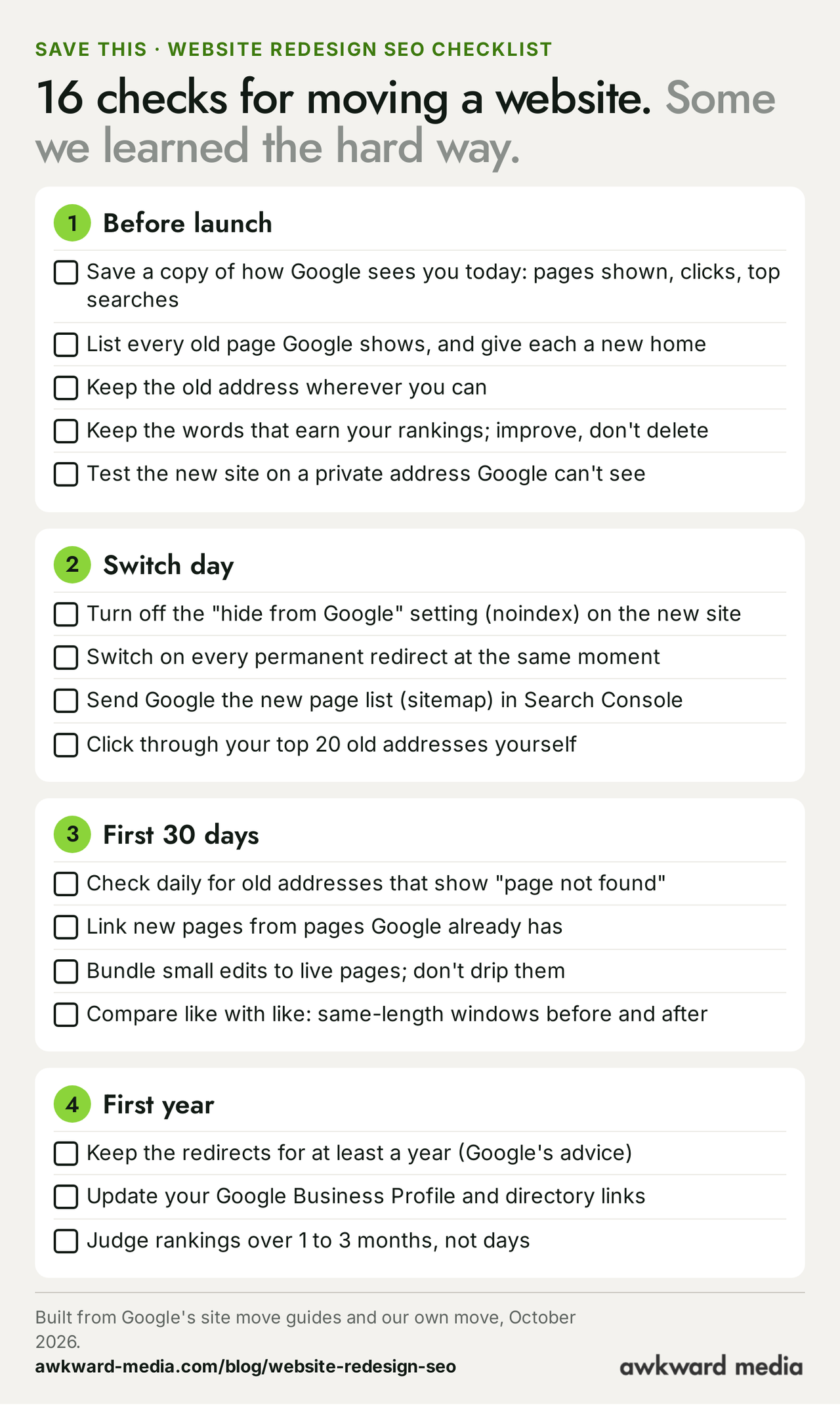
Before launch
- Save a snapshot of today. Ask your web person to export, from Google Search Console, the last three months of pages, searches and clicks. Without a "before", you can't tell whether the "after" is good.
- List every page Google shows for you, and give each a new home. The Search Console export is that list. Every row needs a matching new page or a reason it's being retired.
- Keep addresses wherever you can. A new design doesn't need new addresses.
- Keep the words that earn your rankings. Improve service pages; don't shrink them to fit a template.
- Build on a private test address that Google can't list, so it never sees a half-finished site.
Switch day
- Remove the "do not list" setting (noindex, or the robots.txt block) from the live site.
- Switch on every redirect at the same time as the new site, not over the following days.
- Send Google the new sitemap in Search Console the same day.
- Click your 20 most important old addresses yourself and make sure each lands on the right new page.
The first 30 days, and the first year
- Look for "page not found" every day for the first few weeks. Search Console lists the addresses Google tried and failed to reach.
- Link new pages from your strongest pages: the home page, your main service pages.
- Bundle small edits to live pages into one round every few days.
- Compare like with like: two weeks after against two weeks before, never a good August against a slow October.
- Keep every redirect for at least a year, as Google advises.
- Update your Google Business Profile's website link and your main directory listings to the new addresses.
- Judge rankings over one to three months, not days.
Questions to ask your web designer before you start
Most owners never get to see any of this happen; they hear about it afterwards. These questions, sent before the work starts, tell you whether your rankings are part of the plan. Copy and paste them:
- "Will any page addresses change? If so, can I see the list of old and new addresses before launch?"
- "Will every old address forward permanently, with a 301 redirect, to its matching new page, and will they all switch on at launch?"
- "Which pages are being removed, and have you checked in Search Console that none of them bring in visitors?"
- "How will you stop Google listing the site while it's being built, and who removes that block on launch day?"
- "Will you submit the new sitemap in Search Console on launch day?"
- "Who will check for 'page not found' errors in the first month, and how often?"
A good designer will have answers. If the answer is a shrug, bring in someone whose job is the move itself, whether that's a pre-launch SEO audit or a full website migration service.
How to tell if your redesign hurt you
If your new site is already live and the phone has gone quiet, here's how to find out what happened without learning any tools. Send this to whoever manages your website:
"In Google Search Console, compare the 14 days before our new site went live with the 14 days after: total impressions, total clicks and average position. Then send me the list of addresses under Pages that show 'Not found (404)', and the number of pages listed as indexed."
Then read the answer like this:
- Impressions down sharply, many "not found" pages: broken addresses. The fix is redirects, and it's usually quick.
- Impressions down, few errors, few pages indexed: Google hasn't read the new site yet, or it's being told not to. Check the "do not list" setting first.
- Impressions steady or up, average position down a little: often the mix of searches changing, as it did for us. Watch it for a month before you act.
- Everything down across the board for weeks: something bigger is wrong: pages removed, content cut, or the site hard for Google to read. That's when a technical SEO review pays for itself.
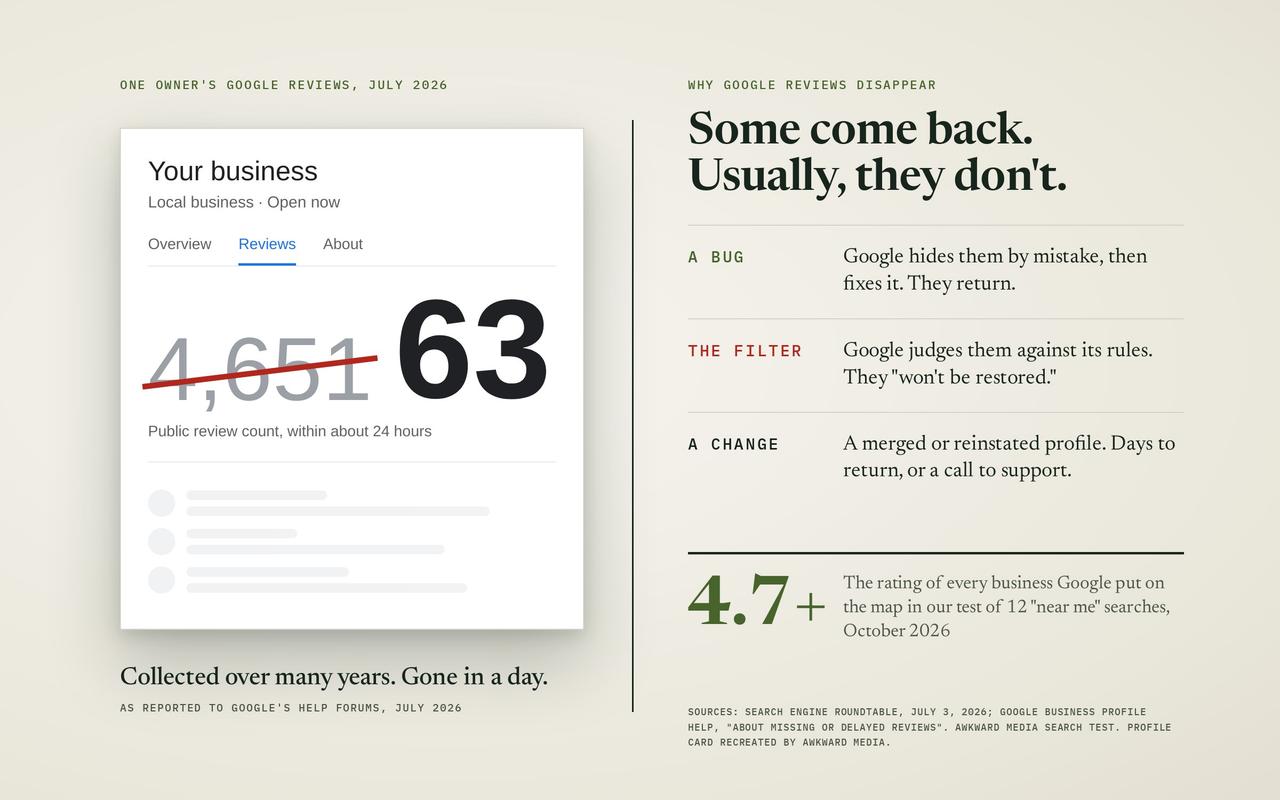
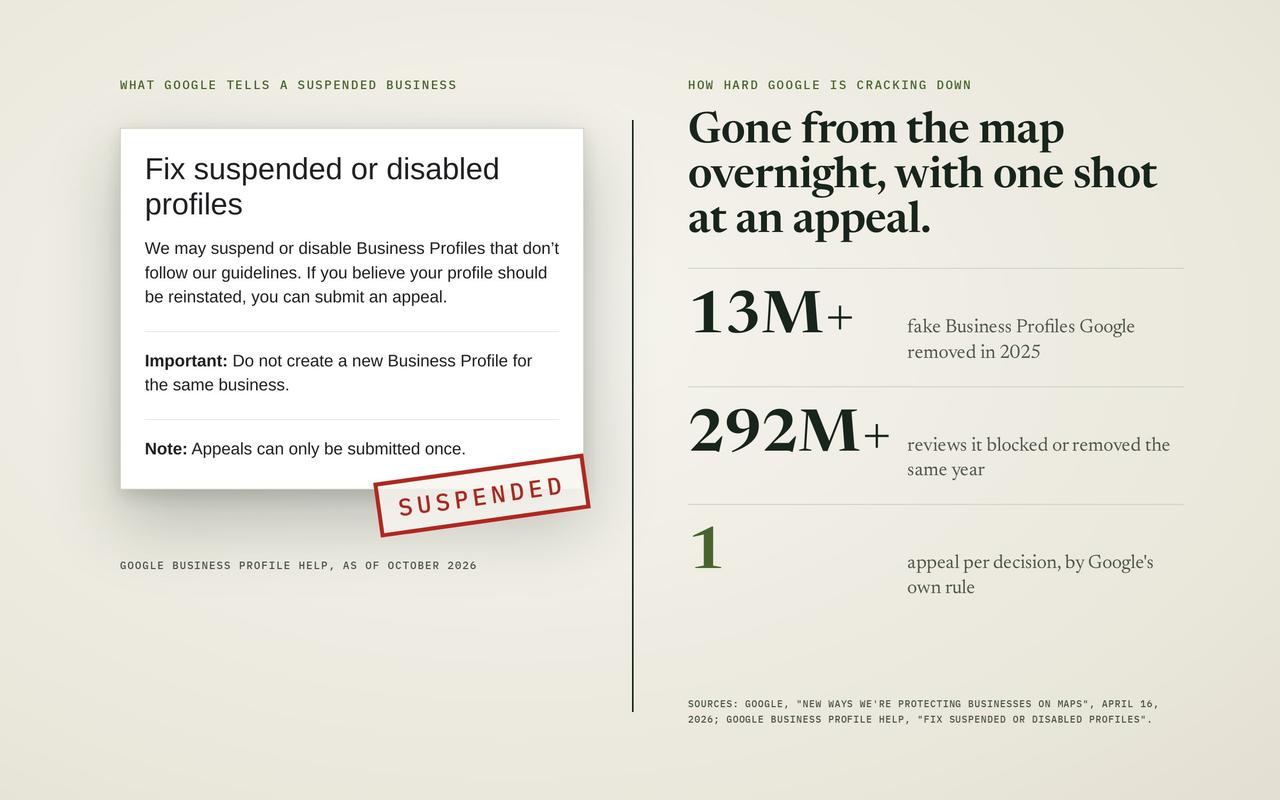
Watch the calls as well as the charts. For most local businesses, the map listing next to Google's results brings more calls than the website does, and it runs on your Google Business Profile as much as on your site. After a move, make sure your profile's website link points to the right page; ours still pointed at an old address in the first week. Our guide on how to rank higher on Google Maps covers the rest, and if your profile has vanished altogether, read what to do when a Google Business Profile is suspended.
What we're watching next
This article is a reading at day 16, not a final score. Here is what we'll check and when:
- Average position, weekly. The test is whether the slip from October 17 reverses once the national search we mentioned points at the right page.
- Pages in Google, until the remaining 62 are read. None turned down is the bar; we'll say if that changes.
- How often Google shows us against August, the level we were at before the old site's slide. We're about 23% short of it today.
- AI answers. Google's AI Overviews draw on the same index as its regular results, so a page Google hasn't filed can't be cited there either. We'll report on that side in our coming study of whether AI agrees with Google on who's best in town. Our guide to Google's AI Overviews explains how those answers pick their sources, and our AI Overviews and ChatGPT SEO pages show how we work on them for clients.
We'll update this article with the next readings, dated, so you can see whether the story held.
Thinking about a new website? Plan the move first
Every service we sell keeps working through a redesign if the move is planned: SEO, local SEO and Google Maps rankings, ecommerce and Shopify SEO, multi-location SEO and AI search. The redesign is when all of that work is most exposed, and when a plan costs least. Whether you're a law firm, a dental practice, a plumber or a builder, the checklist above is the same.
If you run a smaller shop, small business SEO covers the same ground at a smaller scale, and B2B firms with long sales cycles have their own page for B2B SEO. If you'd rather hand it over, we do this for clients, with two guarantees in writing, the same ones on our guarantees page:
- The 20-day guarantee: "If you don't see visible improvement in your key metrics within the first 20 days, we refund $200 on top of returning your payment for that period." The key metrics are agreed with you before we start: your traffic, what that traffic is worth, how much authority your site and its pages carry, and how many other websites link to you, all measured against the day we begin.
- The 60-day guarantee: "If your qualifying keywords aren't on the first page of Google within 60 days, we keep working for free until they are." The qualifying keywords are the searches we agree on together at the start, the ones that bring your business customers.
Our work is for established businesses already doing $20,000 a month or more. See what we've done for clients across industries in Canada and the United States, read what clients say, check our pricing, or read how to choose an SEO agency before you talk to anyone, us included. If you only want a second opinion on your plan, our SEO consulting covers that, and our guide to what an SEO consultant costs shows the going rates. You can read more about us and browse our free resources too. When you're ready, start with a free strategy call from our SEO services page: we'll look at where you stand on Google today and what your redesign needs to protect.
Every fact in this story is linked to its source. Spot something out of date? Tell the editor and we will correct it.
Questions readers ask
Frequently asked questions
Does a website redesign hurt SEO?
Not by itself. Rankings fall after a redesign when page addresses change without redirects, when pages that brought visitors are deleted, when content is cut, or when the new site is left hidden from Google. Avoid those and you're left with a short wait while Google re-reads the site. When we moved our own site in October 2026, Google showed us 51% more often in the two weeks after the move than in the two weeks before.
How long does it take for SEO to recover after a website redesign?
By estimates Gary Illyes of Google showed in October 2026, a site move typically takes 1 to 3 months to settle and 6 months to over a year at the slowest; a small move can be done in a few weeks. Google's written guide says a medium-sized site can take "a few weeks or more". If nothing broke, there may be nothing to recover from.
Will changing my website's design change my Google rankings?
A new look on its own rarely moves rankings much. What moves them is what changes underneath: page addresses, the words on each page, which pages exist, how fast the site loads and how pages link to each other. Keep those as good or better and the design is free to change.
Do I need redirects if I keep the same domain?
Yes, for any page whose address changes. Keeping the domain name doesn't help a page that moved from one address to another on it. Each old address needs a permanent redirect to its matching new page.
What is a 301 redirect?
A permanent forwarding rule. When a browser or Google asks for an old address, the website answers "this page has moved for good" and sends them to the new one. Google uses it to move a page's standing to its new address. Google advises keeping these redirects for at least a year.
Should I change my page addresses during a redesign?
Only when there's a real reason, such as a clearer structure or a confusing old address. Every changed address needs a redirect and some patience while Google follows it. Keeping addresses is the cheapest way to protect rankings.
What's the difference between a website redesign and a website migration?
A redesign changes how the site looks. A migration changes where its pages live: new addresses, new software, new hosting or a new domain. Most real redesigns include some migration, which is why the redirect plan matters as much as the design.
How do I know if my redesign hurt my SEO?
Compare the 14 days after launch with the 14 days before, in Google Search Console: impressions, clicks and average position. Then check the list of "not found" pages and how many pages are indexed. Same-length windows matter: comparing a busy month with a quiet one tells you nothing.
Why did my traffic drop after a website redesign?
The usual causes, in order: old addresses with no redirect, pages removed, content cut down, the new site left hidden from Google, or Google not having re-read the site yet. Search Console's page report shows the first and the last; a page-by-page comparison of old and new shows the rest.
Should I submit a new sitemap after a redesign?
Yes, on launch day, through Google Search Console. A sitemap is a file listing the pages you want Google to know about. Google says submitting one "can help make the discovery process quicker". We sent ours the day the new site went live.
How long should I keep redirects after a website move?
Google's guide says "as long as possible, generally at least 1 year", so it can move all of a page's signals to the new address, including links from other websites. Many sites simply keep them for good.
Can a website redesign improve SEO?
Yes, when it adds what Google and customers want: more useful pages, clearer service and location pages, faster loading, and better links between pages. Our new site has more location, service and industry pages than the old one, and Google is showing it more often. The gain comes from the pages, not the paint.
About the author