Awkward Media

Multi-Location SEO · Canada and the USA

Multi-location SEOfor every branch.

You have five locations. Google shows one. The others sit on page three while a single-shop competitor takes their calls. We make every branch rank in its own town: its own page, its own Google listing, its own reviews and local links. Head office gets one report with every branch in it.

GuaranteePage one in 60 days, or we keep working free.

30 minutes on Google Meet. For businesses doing $20k a month or more.

A regional manager presses a green pin into a town on a large wall map with other branches already pinned, while a colleague checks the same locations on a laptop
Every branchMaps rank, searched in each town
  1. North branch#19#2 on Maps
  2. Lakeshore#27#3 on Maps
  3. West end#14#1 on Maps
  4. AirportNot found#4 on Maps
  5. Downtown#9#2 on Maps

Illustration. Your branches and towns will differ.

(01) What multi-location SEO is

One brand. Five branches. Google picked one.

Multi-location SEO is getting every one of your locations found by the people searching near it: on Google Maps, in the normal Google results and in AI answers. Not the brand in general. Each branch, in each town, for the jobs it actually does.

Here’s where chains lose it. The branch pages were made from one template with the town name swapped. Same words, same photos, same everything. So Google shows one of them and quietly hides the rest.

Then the listings drift. One branch has an old phone number on a directory, another has the wrong hours on Google, a third has twelve reviews and nobody replying to them. Meanwhile a one-shop competitor down the road takes the calls your branch should be getting.

Most agencies hand you one template, swap the town names and call it multi-location SEO. That’s the problem, not the fix. We build every branch properly, whether you have two locations or two hundred.

Same template, town name swapped

North branch page

Shown

Lakeshore page

Hidden

West end page

Hidden
What we build instead

North branch page

Ranks
Its own teamIts reviewsParkingTowns it covers

Lakeshore page

Ranks
Weekend hoursIts reviewsLocal job photos

West end page

Ranks
Its own teamDirectionsServices sold here

Illustration.

(02) What every location gets

Six things per branch. No branch left out.

A branch ranks when it looks like the best local answer to the person searching nearby. That takes the same six things at every location. Miss one at a branch and that branch slips, however strong the brand is.

PageListingReviewsLinksDetailsTracking
North branch✓✓✓✓✓✓
Lakeshore✓✓✓✓✓✓
West end✓✓✓✓✓✓
Airport✓✓✓✓✓✓
Downtown✓✓✓✓✓✓

Illustration: the checklist we keep for every location.

01

A page that belongs to the town

Its own address, its own team, the services that branch sells, the towns it covers, real photos and reviews from its own customers. Written for the person searching there, not copied from the branch next door.

On-page SEO →
02

A Google listing that is complete

The box on Google Maps with your hours, photos and reviews. One per real branch, each with the right main category, every service listed, real photos and regular updates.

Local SEO →
03

Reviews coming in at every branch

A simple way for each location to ask happy customers, and a reply to every review. Reviews are one of the signals Google weighs, and buyers read them before they call.

04

Links from its own town

Local news, associations, suppliers and sponsorships near each branch. A mention from the next town over helps less than one from down the street.

Link building →
05

The same details everywhere

Name, address, phone and hours identical on Google, on your site and across the directories Google checks. When a branch moves or changes its hours, every copy changes with it.

06

Its own numbers

Calls, forms and bookings counted per branch, and rankings checked from inside each town. Head office sees which locations are winning and which need work.

And on top of all six: AI SEO, so ChatGPT and Google’s AI name the right branch when someone asks who to call nearby. Included in every plan.

(03) Location pages

A location page, taken apart. Eight parts.

Every branch gets a page like this. The team, the reviews and the local answers are the parts a template can’t fake, and they’re what make each page worth ranking on its own.

yourbrand.com/locations/lakeshore
1

Furnace repair in Lakeshore

Same-day visits from our Lakeshore team

2

214 Shore Rd, Lakeshore

(555) 010-0144

Mon to Sat, 7am to 7pm

3

Dana, Luis and Priya run the Lakeshore team

4Furnace repairAC installHeat pumps
5LakeshoreBayviewPine HillsHarbour
6
★★★★★
“Came out the same morning, fixed in an hour.”
7

Is there parking? ›

Do you come out on Sundays? ›

8

Lakeshore · 214 Shore Rd · Mon to Sat · Furnace repair

Illustration of a location page. Names and details are made up.

What goes on every location page

  • 1The town and the job, up top. “Furnace repair in Lakeshore”, not “Welcome to our Lakeshore location”. The first line says what this branch does and where.
  • 2Real address, phone and hours. Exactly as they appear on the branch’s Google listing, with a map and directions people can use.
  • 3The people who work there. Names and faces of the branch team. Buyers trust a person, and no other branch page can copy this.
  • 4Services sold at this branch. Only what this location actually does, each linked to its service page.
  • 5Towns and neighbourhoods it covers. The places this branch drives to, so it shows up for searches made there too.
  • 6Its own reviews and job photos. Words from customers of this branch, and photos of work done nearby.
  • 7Local answers. Parking, weekend hours, what a visit costs, how fast they can come out. The questions people in that town ask.
  • 8Details that match the listing. The branch’s name, address, hours and services, word for word the same as on its Google listing.

One branch serves a lot of towns? Each town that matters gets its own page too. That’s how one office ranks across a whole region, and it’s the heart of our map pack expansion work: getting one office into the top Google Maps results in towns further and further from its door.

(04) Town by town

Every town is its own search. Here’s winning them.

Multi-location SEO is the same job done well, again and again, in every town you serve. These screenshots show it working far from the front door and on a city page.

Google MapsStorm shutters, North Carolina coast

American Hurricane Shutters

#1

for “storm shutters near me”,
searched 52 miles from the shop

Based in Wilmington, with customers up and down the coast. We built relevance city by city across the area they really serve, instead of the few blocks around the office. Searched from Ocean Isle Beach, they come up first.

Read the case study
Google Maps view of the North Carolina coast with the search point pinned at Ocean Isle Beach and American Hurricane Shutters in Wilmington, about 52 miles apart
American Hurricane Shutters listed first on Google Maps for Storm Shutters Near Me, 4.7 stars from 62 reviews

The search point is Ocean Isle Beach. The shop is in Wilmington.

City pageProbate law, Florida

Florida Probate Law Group

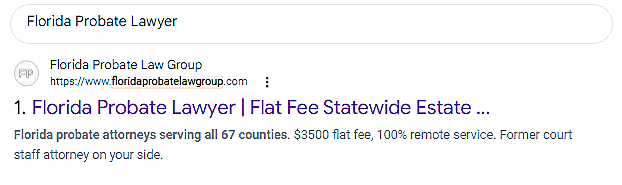
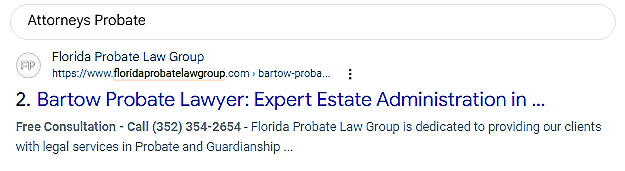
#1 statewide for “Florida probate lawyer”. And for the broad search “attorneys probate”, Google picked their Bartow city page at #2. A strong site lets its local pages compete too.

Read the case study →
Google result number 1 for Florida Probate Lawyer: Florida Probate Law Group
Google result number 2 for Attorneys Probate: the Florida Probate Law Group Bartow probate lawyer page
Google MapsLouisville, KY

360 Hazardous Cleanup

#37

#1

For “blood cleanup services” on Maps. In 20 days, all 8 tracked searches reached the top three.

Read the case study →

(05) How multi-location SEO runs

From first branch to last. Six steps.

We start with the free audit of every location, then work through the branches in the order that brings in the most calls first. Month to month, no long contract.

Opening a new branch? The launch checklist

  • ✓Google listing claimed and verified the day the branch opens
  • ✓Location page live before the doors open, linked from the locations list
  • ✓Name, address and phone sent to the main directories
  • ✓Review routine set up with the branch manager
  • ✓First local links: chamber, local news, suppliers
  • ✓Rankings checked from the new town in week one
01

Map every branch

Every location, the towns each one serves, and the jobs that make money at each. A busy downtown branch and a suburban one rarely need the same searches.

02

Check rank from inside each town

We search the way a customer near each branch would, on Google and on the map, and see who sits above you there. That becomes each branch’s starting point.

03

Fix the listings first

Wrong categories, missing services, old phone numbers, duplicates. Listing fixes are often the fastest wins, so they go first.

04

Build or rewrite the location pages

One real page per branch, then pages for the towns each branch covers. No copy and paste.

05

Reviews and local links, branch by branch

A review routine each location can actually keep up, and links from sites in each town.

06

One report for head office

Every branch in one monthly report: rankings, calls and the work done, walked through live. Weak branches get attention first.

(06) Which kind are you?

Real branches, or one office with a big map. Different plans.

You have several real locations

Clinics, stores, offices or depots with staff at each address. Every one gets its own Google listing, its own page and its own rankings. Franchises fit here too: each franchisee’s location is a branch.

We only set up listings for real addresses with real staff. Never fake ones.

One office, many towns

Trades and services that drive to customers. One listing, plus a page for each town you serve and the work that pushes your map rankings outward, town by town, like American Hurricane Shutters above.

Map pack expansion →

(07) Why branches go missing

Eight mistakes that hide branches. We fix all of them.

We see these at almost every business with more than one location. Most of them can be fixed in the first month. The free audit shows which ones are costing you calls, branch by branch.

How the SEO audit works →
01

Copy-and-paste branch pages

The same text with the town name swapped. Google keeps one and hides the rest, so most branches never get a chance.

02

One page listing every address

A page that names ten towns ranks in none of them. Each branch needs a page of its own.

03

Listings for addresses with no staff

Virtual offices and mailbox addresses get listings suspended, and a suspension can take months to undo. We only list real branches.

04

Old details nobody updated

A branch moved, a phone number changed, holiday hours were never set. Customers call the wrong place, and Google trusts the listing less.

05

Reviews at one branch, silence at the rest

The flagship has hundreds of reviews and the newer branches have a handful. Each branch is judged on its own.

06

Every branch chasing the same search

Five pages all aimed at the same city-wide search push each other down. Each branch gets its own town and its own jobs.

07

Reporting on the brand, not the branch

A report saying “traffic is up” hides the three branches going backwards. We show every branch, every month.

08

Waiting until a branch opens

A new location with no listing and no page loses its first months. The launch checklist starts before the doors open.

(08) What it costs

Multi-location SEO pricing. Real numbers.

Your number depends on how many locations you have and how tough each town is. The audit of every branch is free, and you get the exact price on the call.

Free

Strategy call and audit

30 minutes on Google Meet. We search from your branch towns live, show you which locations Google shows and which it hides, and who takes the calls instead.

Book the call →

Local and organic SEO

$1,497 to $5,000/mo

Google Maps, the normal Google results, or both. Where most businesses with a handful of locations land. Month to month. AI SEO included.

See SEO pricing →

Several websites

$5,000+/mo

A site per brand or per region, or a big network of locations. Same two guarantees, same month-to-month terms.

Get my exact number →

Want to see how far one branch can reach first? The free 50-Mile Radius Playbook walks through it.

As seen in and rated on

USA Today LA Weekly Clutch TopSEO UpCity

(09) Before you sign

Five questions for any multi-location SEO agency.

Ask every agency these. Here are our answers, no dodging.

Will every branch get its own page, or one page with a list?

Its own page, written for that town, with its own team, services, reviews and answers. A list of addresses on one page doesn’t rank anywhere.

Who looks after each Google listing?

We do, for every branch: categories, services, photos, updates and review replies. You stay the owner of every listing.

How will head office see what each branch gets?

One monthly report with every branch in it: rankings from inside each town, calls and the work done, walked through live. Plus our app, where you can see it all any time and ask its AI agent anything.

What happens if it doesn’t work?

No visible improvement in 20 days: your payment back plus $200. Qualifying keywords not on page one of Google in 60 days: we keep working free until they are.

How long is the contract?

Month to month. No twelve-month lock-in, however many locations you have.

Our SEO guarantees

Two guarantees at every branch. 20 days or your money back, plus $200.

Guarantee 01

20days

If you don’t see visible improvement in your key metrics within the first 20 days, we refund $200 on top of returning your payment for that period.

What we measure: your traffic, what that traffic is worth, how much authority your site and its pages carry, and how many other sites link to you, against the day we start.

Guarantee 02

60days

If your qualifying keywords aren’t on the first page of Google within 60 days, we keep working for free until they are.

What counts: at least one high-value search for your business on page one of Google.

No long-term contracts. Results keep you here. Paperwork doesn't.

Your next step

See which branches Google is hiding.

On a free 30 minute call we search from your branch towns live, show you which locations Google shows and which it hides, and who is taking those calls instead.

Bring with you

Your websiteYour main serviceTowns you serveCompetitors you see
  1. 01

    We search your market live

    The way your customers do, in the towns you serve.

  2. 02

    We show who's above you, and why

    On Google, on Maps and in the AI answers.

  3. 03

    You leave with a road map

    Yours to keep. If we can help, we'll invite you to work with us.

For established businesses doing at least $20,000 a month.

(10) Questions

Multi-location SEO, answered.

What owners and head offices ask us before they start.

Plan my locations on a free call
01 What is multi-location SEO?

Multi-location SEO is getting every one of your locations found by people searching near it, on Google Maps, in the normal Google results and in AI answers. Each branch gets its own page, its own complete Google listing, its own reviews and local links, so it can rank in its own town instead of the brand ranking in just one place.

02 How is it different from local SEO?

Local SEO is the work for one location. Multi-location SEO is the same work for every branch at once, kept consistent, without the branches copying each other or competing for the same searches, and reported to head office in one place.

03 Do I need a separate page for each location?

Yes. A single page with a list of addresses doesn't rank in any of those towns. Each branch needs its own page with its own address, team, services, reviews and local answers, so Google has a real reason to show it.

04 Can I use the same text on every location page?

You can, but Google tends to show one of the copies and hide the rest. Each page needs things only that branch has: its people, its reviews, its photos, its parking and hours, the towns it covers.

05 Do you manage the Google Business Profile for every branch?

Yes. Your Google Business Profile is the listing on Google Maps with your hours, photos and reviews. We handle categories, services, photos, regular updates and review replies for every branch, and you stay the owner of each one.

06 Should each location have its own website?

Usually not. One website with a page per location is easier for Google to trust and much easier to look after. Separate sites make sense for separate brands or regions, and we handle those too.

07 How do you handle reviews across locations?

Each branch gets a simple routine for asking happy customers, and every review gets a reply. Reviews are one of the signals Google weighs, and people read them before they call, so a branch with few or old reviews is at a disadvantage.

08 Why does one of our branches rank and the others don't?

Usually one of three things: the branch pages copy each other, some listings are incomplete or have the wrong details, or the strong branch has far more reviews and local links. The free audit shows which, branch by branch.

09 We only have one office but serve lots of towns. Is this for us?

Partly. You get one Google listing, because listings are only for real addresses with staff, plus a page for each town you serve and the work that pushes your map rankings out across the region. That is our map pack expansion service.

10 Do you do SEO for franchises?

Yes. Each franchise location is treated as a branch with its own page, listing, reviews and local links, while the brand stays consistent across all of them. Head office gets one report with every location in it.

11 How much does multi-location SEO cost?

Local SEO, organic SEO, or the two together usually run between $1,497 and $5,000 a month. Several websites usually start at $5,000 a month. Your exact number depends on how many locations you have and how competitive each town is, and you get it on the strategy call. The audit is free.

12 How long does it take to see results?

Two guarantees, in writing. If you don't see visible improvement in your key metrics within the first 20 days, we refund $200 on top of returning your payment for that period. If your qualifying keywords aren't on the first page of Google within 60 days, we keep working for free until they are.

13 Which branches do you work on first?

The ones where a fix brings in the most calls soonest. That is often a busy branch hidden behind a duplicate page or a broken listing. The audit ranks every branch so you can see the order.

14 We are opening a new location. What should we do?

Talk to us before it opens. The listing should be claimed and verified on day one, the location page live before the doors open, and the branch's details sent to the main directories. Then reviews and local links start from week one.

15 A branch moved or closed. What happens to its rankings?

We update the listing, the page and every directory copy so nothing points to the old address. A closed branch's page is pointed at the nearest open one, so its visitors and value aren't lost.

16 Do AI tools like ChatGPT name the right branch?

They can, when each branch page says plainly what it does, where, and for whom, and its details match everywhere. Getting the right branch named in ChatGPT, Gemini and Google's AI Overviews is part of every plan, at no extra cost.

17 Will you report on each location separately?

Yes. One monthly report for head office with every branch in it: rankings checked from inside each town, calls and bookings, and the work done that month, walked through live.

18 Can we list a branch at a virtual office or a mailbox?

No. Google can suspend listings at addresses with no staff, and it can take months to get one back. We list real branches only, and use town pages to reach the places you serve without an office.

19 Can you take over branches another agency set up?

Yes. You stay the owner of every listing, so we are added as managers, check every branch, and fix what was missed. Nothing is deleted on day one.

20 Am I locked into a long contract?

No. Month to month, however many locations you have.

21 Who is multi-location SEO for?

Established businesses in Canada and the US doing $20,000 a month or more, with two locations or two hundred, and a service people search for near each one. We take on 15 new clients a month so every branch gets the work done properly.