Awkward Media

Google Business Profile optimization · Canada and the USA

Google Business Profile optimization, done for you.

Your Google Business Profile (GBP) is the listing people see when they search for what you do: your name, stars, photos, hours and the call button, on the map and beside the results. We set up every part of it the way Google reads it, keep it active every week, and build the trust around it that moves you up.

30 minutes on Google Meet. For businesses doing $20k a month or more.

A result from our work · Sanjay Grover MD, Newport Beach CA

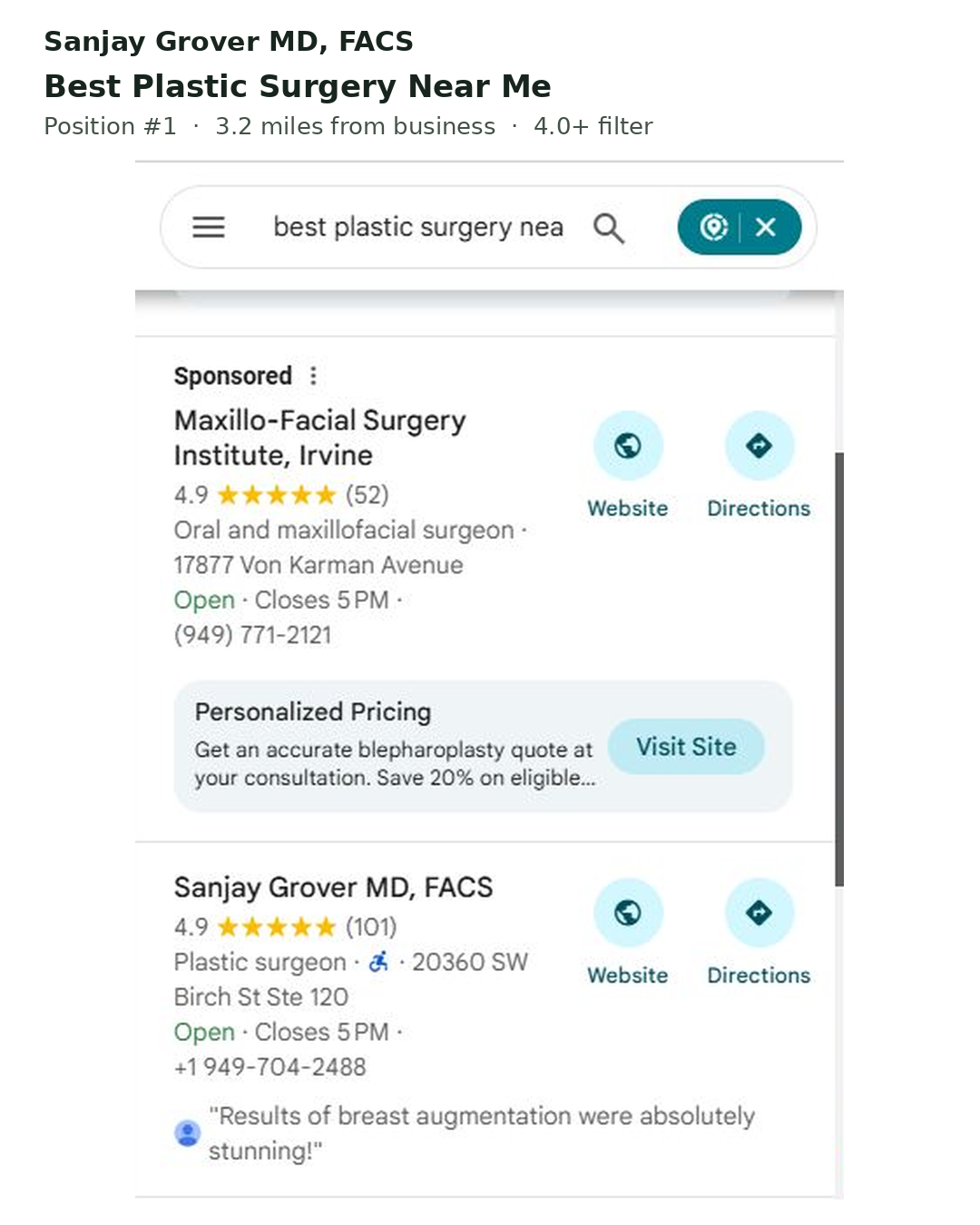
Google Maps: “best plastic surgery near me”

From #17 to first on the map in 20 days.

#1

As seen in and rated on

USA Today LA Weekly Clutch TopSEO UpCity

(01) Profiles we rank

Same business. First on the map.

Just a few of the businesses whose profiles we work on. Screenshots from the work, cropped to the listing. Look at the search, then look at who’s first.

Sanjay Grover MD, FACS · Newport Beach, California

From #17 to first on Google Maps for “best plastic surgery near me”, in 20 days.

Google Maps results for best plastic surgery near me: one sponsored listing, then Sanjay Grover MD, FACS, plastic surgeon, 4.9 stars from 101 reviews
Look under the ad. The first business Google ranks for the search is Sanjay Grover MD.

Before

#17

on the map

After

#1

below one ad

Time

20

days

Same practice, same address, same doctor. What we worked on: how completely the profile tells Google what the practice does, and how much trust Google can find for it across the web.

Grand Oaks Orthodontics · Oakville, Ontario

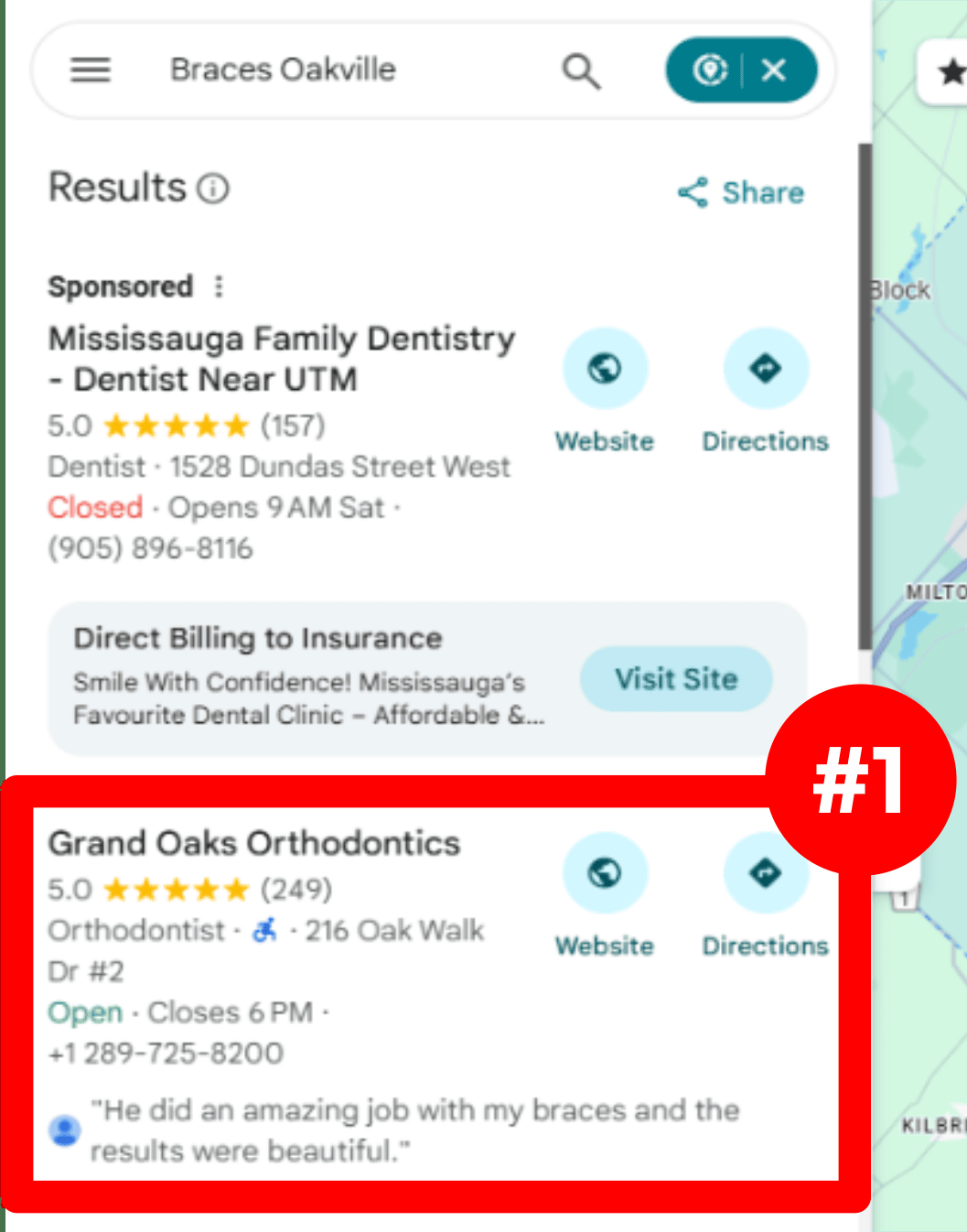
First on Google Maps for “braces Oakville”.

Google Maps results for Braces Oakville: one sponsored dentist, then Grand Oaks Orthodontics, 5.0 stars from 249 reviews, marked #1
Google Maps, “braces Oakville”: Grand Oaks Orthodontics is the first business below the sponsored listing.

The search

“braces Oakville”

Position

#1

Mae Fence Company · Fulton

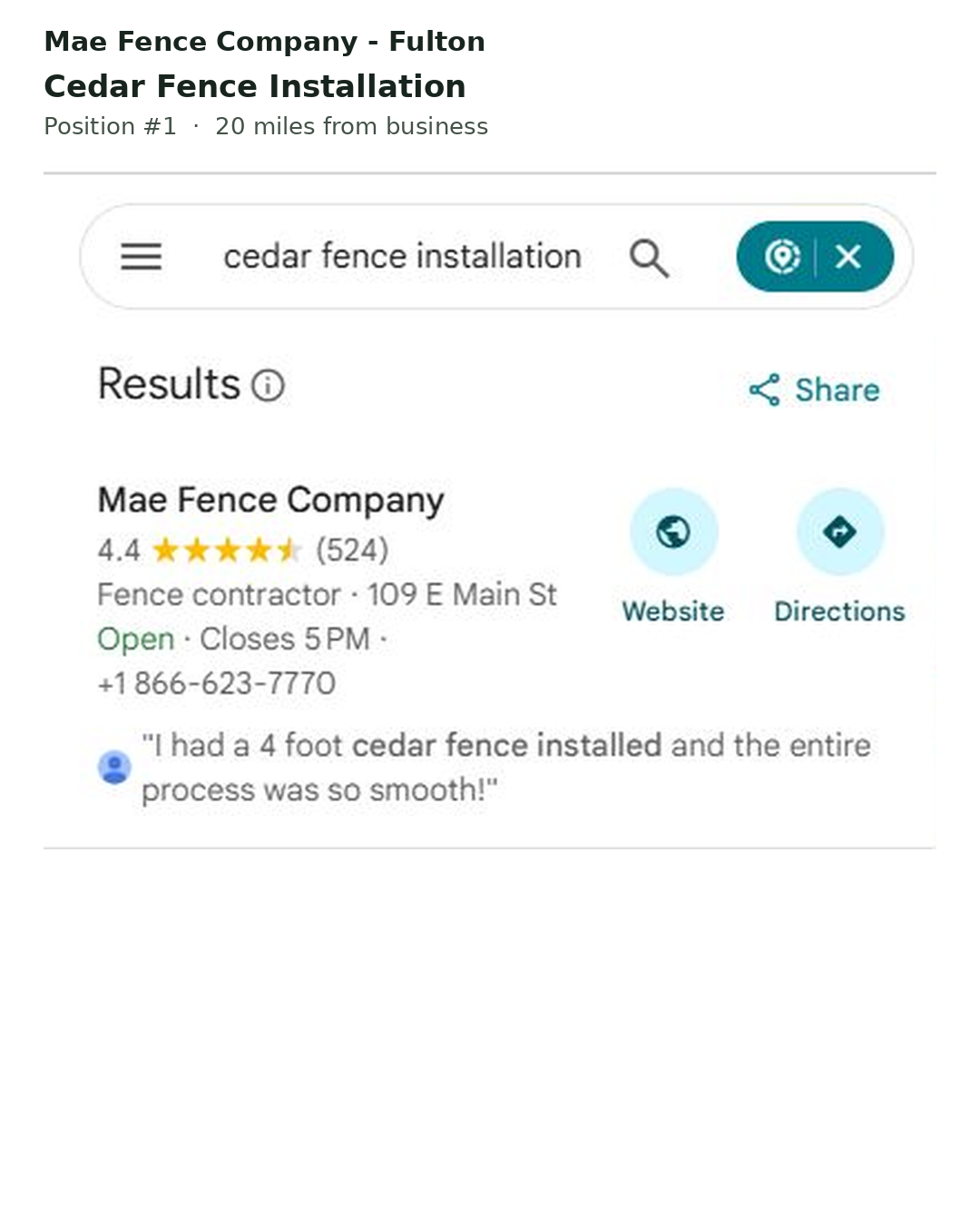
First on Google Maps for “cedar fence installation”.

Google Maps results for cedar fence installation: Mae Fence Company first, fence contractor, 4.4 stars from 524 reviews
Google Maps, “cedar fence installation”: Mae Fence Company is the first result.

The search

“cedar fence installation”

Position

#1

Google Maps · Cape Coral, Florida

Non-Stop Air Conditioning and Heating

8 of 8tracked searches
in the top 3
More businesses we rank on Google Maps→

(02) More from the map

Different trades. Same first place.

Surgeons, lawyers, movers, cleanup crews, shutter installers. Every picture below is a real Google Maps result from our client reports, cropped to the list. Find the search at the top, then find our client.

Sanjay Grover MD, FACS · Newport Beach, California

Seven of eight searches in Google’s top three on the map, in 20 days.

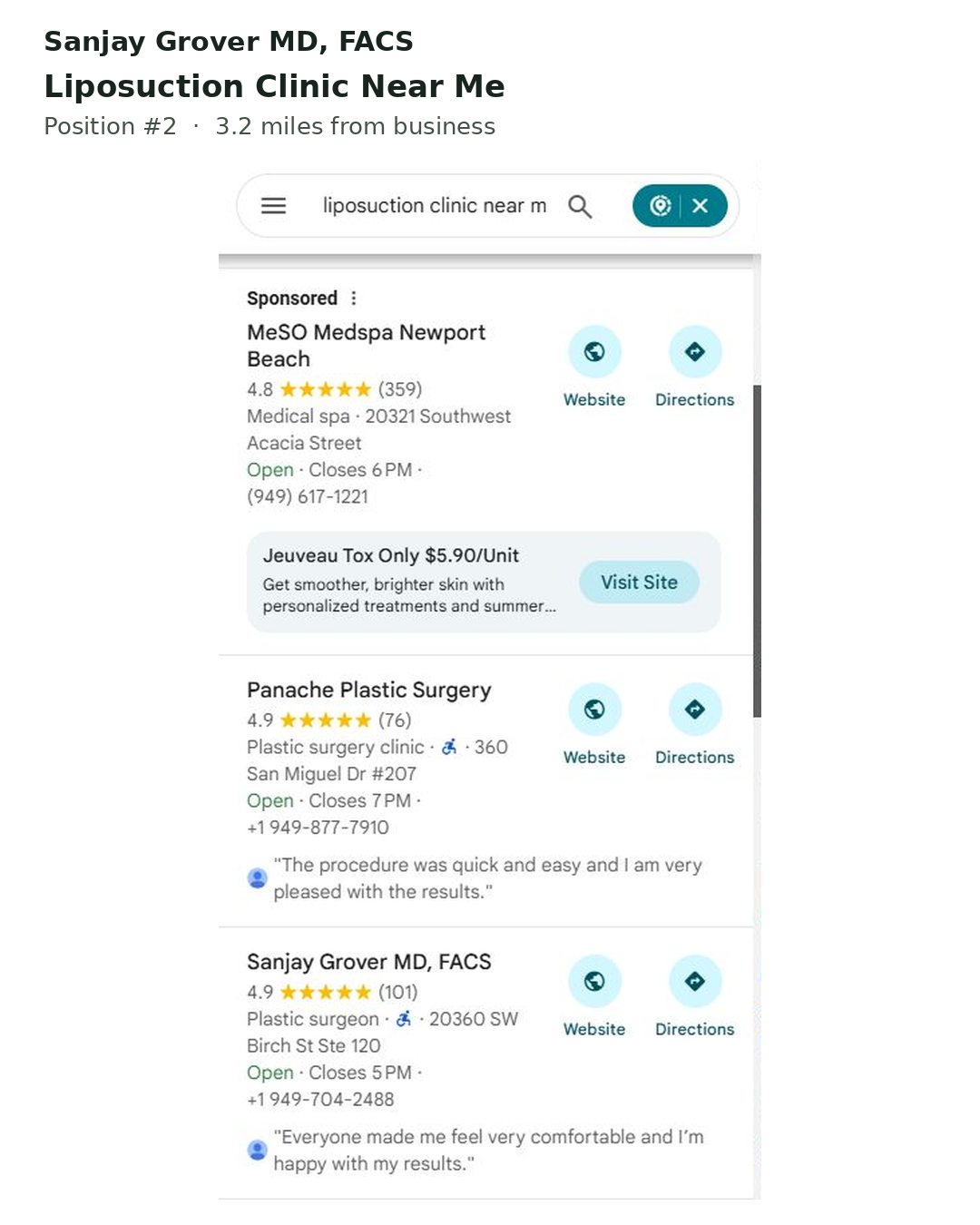
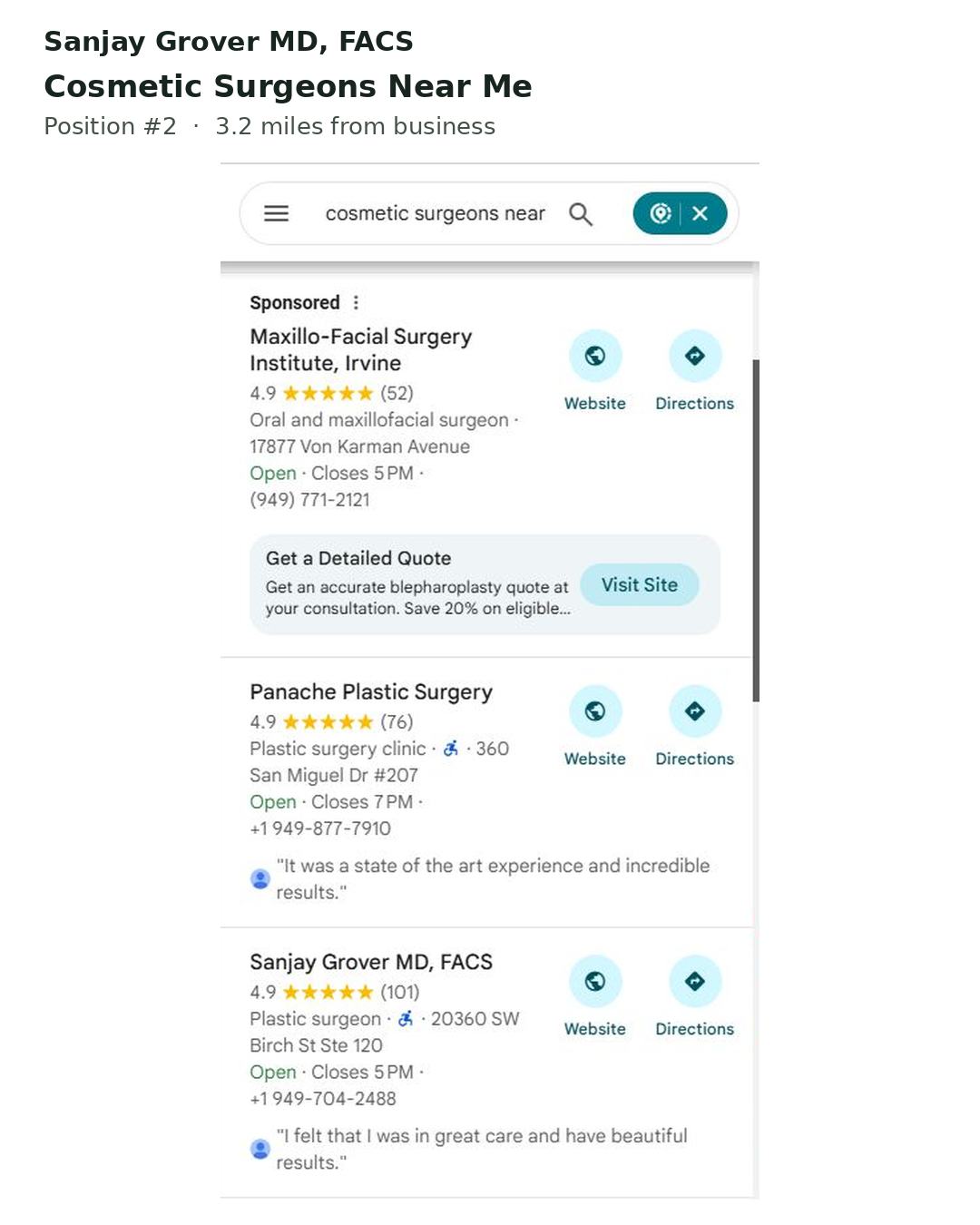
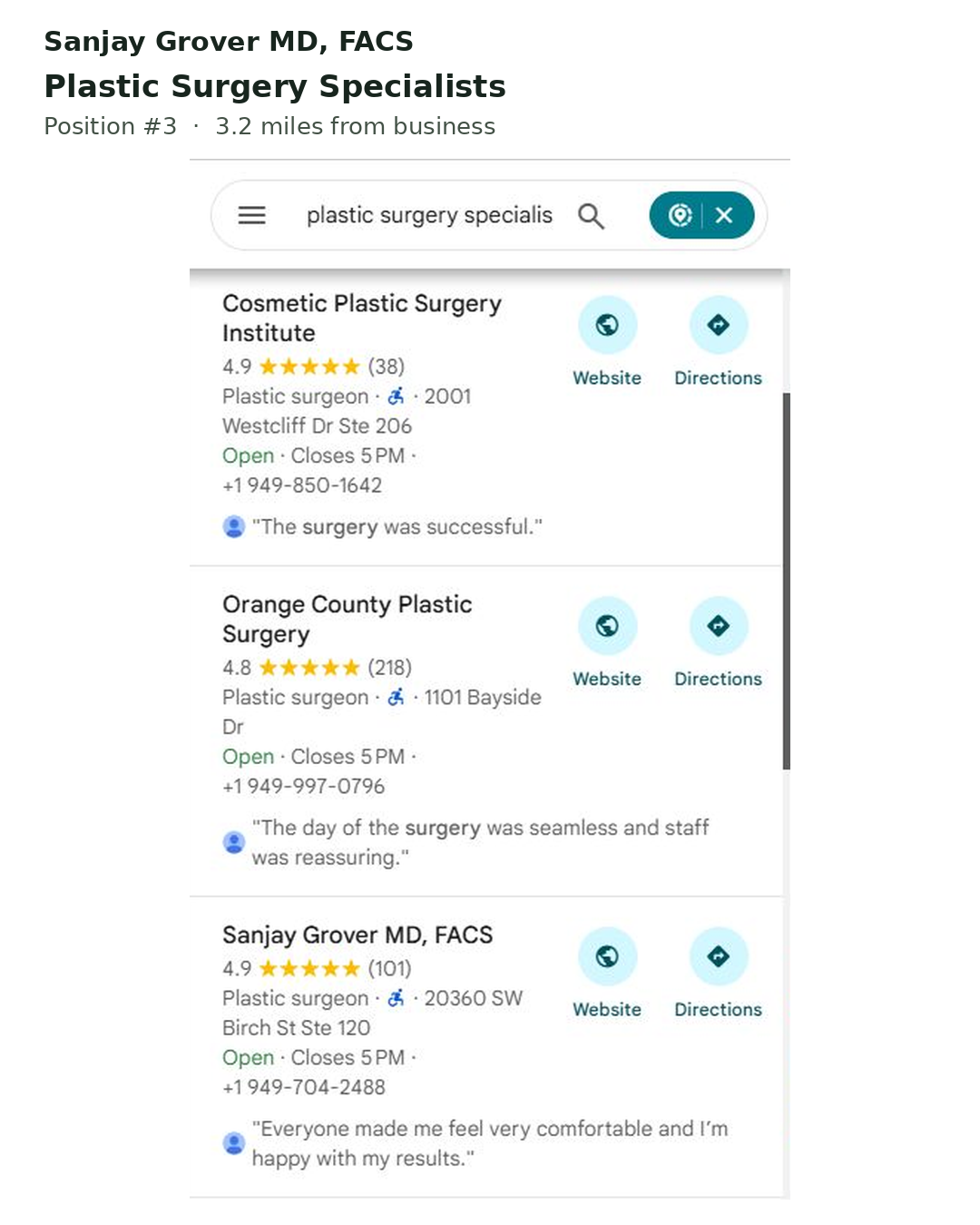
The #17 to #1 above was one of eight searches we tracked for this practice. Four finished first. Here are three more, each from the 20-day report. Look past the sponsored listing and the two clinics above: the third business down is Sanjay Grover MD, FACS.

Google Maps results for liposuction clinic near me: a sponsored med spa, Panache Plastic Surgery, then Sanjay Grover MD, FACS with 4.9 stars from 101 reviews

“liposuction clinic near me”

#21 → #2

Third listing on the screen, second business after the sponsored one.

Google Maps results for cosmetic surgeons near me: a sponsored listing, Panache Plastic Surgery, then Sanjay Grover MD, FACS

“cosmetic surgeons near me”

#24 → #2

Second business after the sponsored one.

Google Maps results for plastic surgery specialists: Cosmetic Plastic Surgery Institute, Orange County Plastic Surgery, then Sanjay Grover MD, FACS

“plastic surgery specialists”

#20 → #3

Third on the map, from #20.

360 Hazardous Cleanup · Louisville, Kentucky

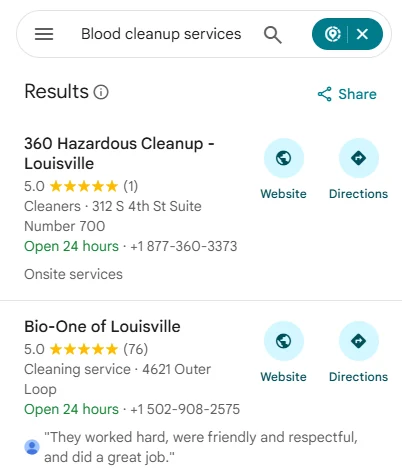
First on the map with 1 review, above a business with 76.

Google Maps results for blood cleanup services: 360 Hazardous Cleanup Louisville first with 5.0 stars from 1 review, Bio-One of Louisville second with 5.0 from 76 reviews

For “blood cleanup services” the profile went from #37 to #1 in 20 days, and all eight searches we tracked reached the top three. Count the reviews in the crop: 1 against 76. Reviews are one signal Google weighs, and the easiest one to count, which is exactly why this picture is worth a look. The rest of the climb came from the profile itself and the trust built around it.

Blood cleanup services

#37 → #1

Searches in the top 3

8 of 8

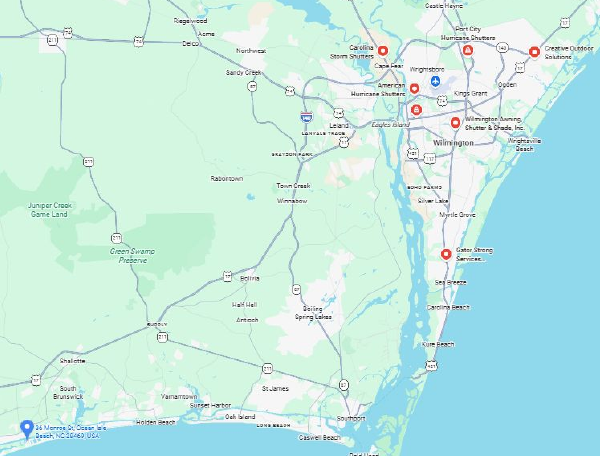
American Hurricane Shutters · Wilmington, North Carolina

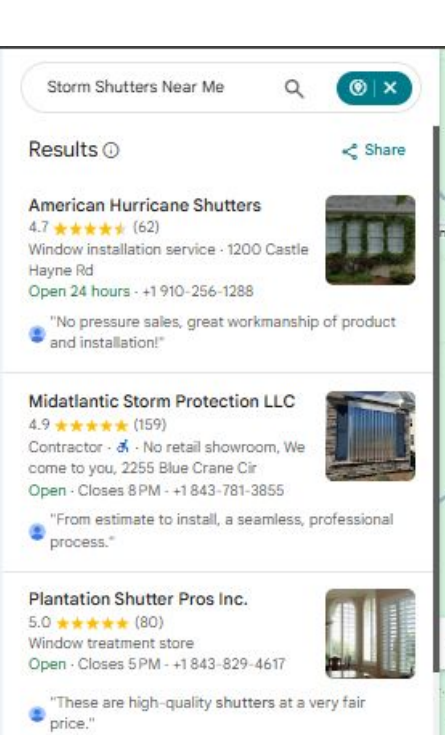
First for “storm shutters near me”, searched 52 miles away.

Google Maps results for storm shutters near me searched from Ocean Isle Beach: American Hurricane Shutters first with 62 reviews, Midatlantic Storm Protection second with 159, Plantation Shutter Pros third with 80Google map of the North Carolina coast: American Hurricane Shutters near Wilmington at the top, the search point at Ocean Isle Beach at the bottom left

Searched from Ocean Isle Beach, 52 miles from the shop, American Hurricane Shutters is first with 62 reviews. Second place has 159, third has 80. Distance and review counts both say this listing should not win. A complete profile and a website and web presence that back it up say otherwise.

Distance searched from

52 miles

Reviews, first vs second

62 vs 159

Law Offices of Jason M. Ranallo · Canton, Massachusetts

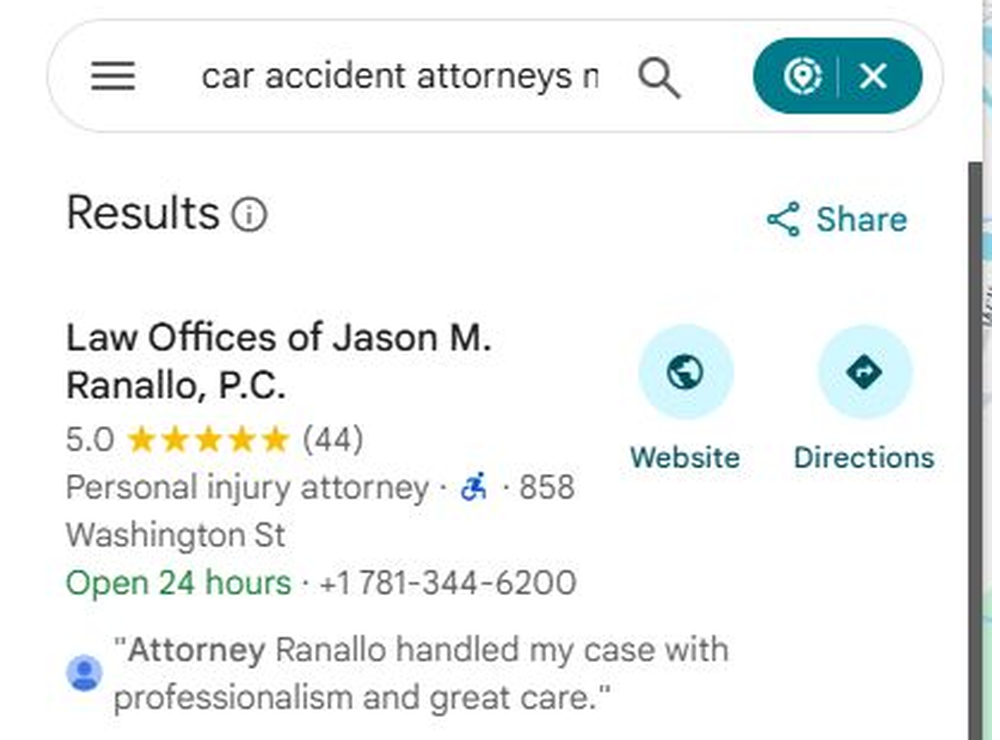
From #10 to first for “car accident attorneys near me”, in 20 days.

Google Maps results for car accident attorneys near me: Law Offices of Jason M. Ranallo, P.C. first, 5.0 stars from 44 reviews, personal injury attorney

A personal injury firm in one of the most crowded searches on Google Maps. Eight searches tracked, all eight in the top three by day 20, two of them at #1.

Car accident attorneys near me

#10 → #1

Searches in the top 3

8 of 8

Brooks Moving and Hauling · Jupiter, Florida

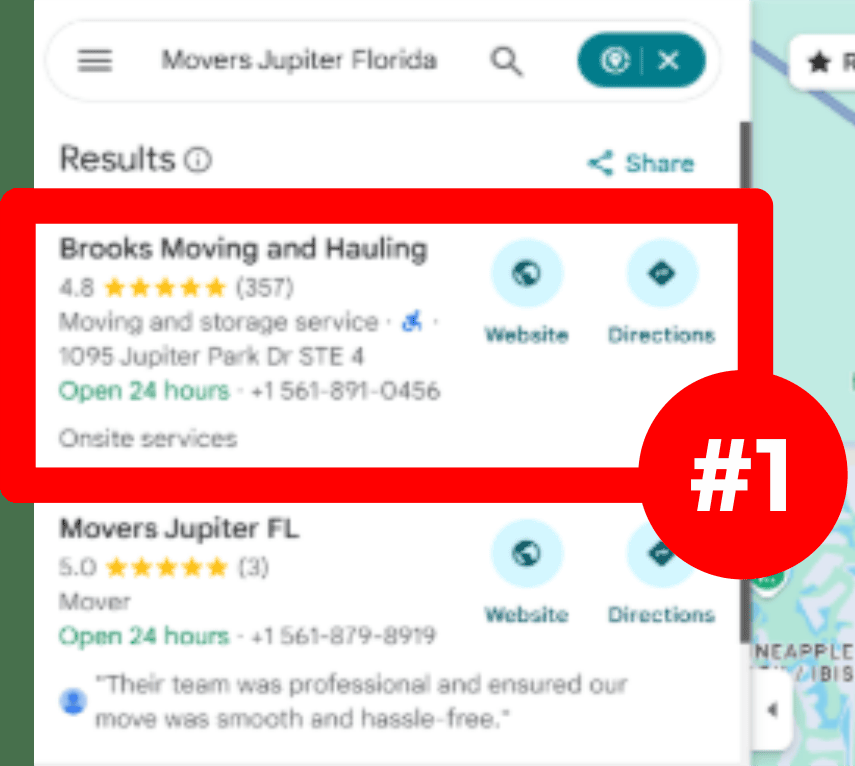
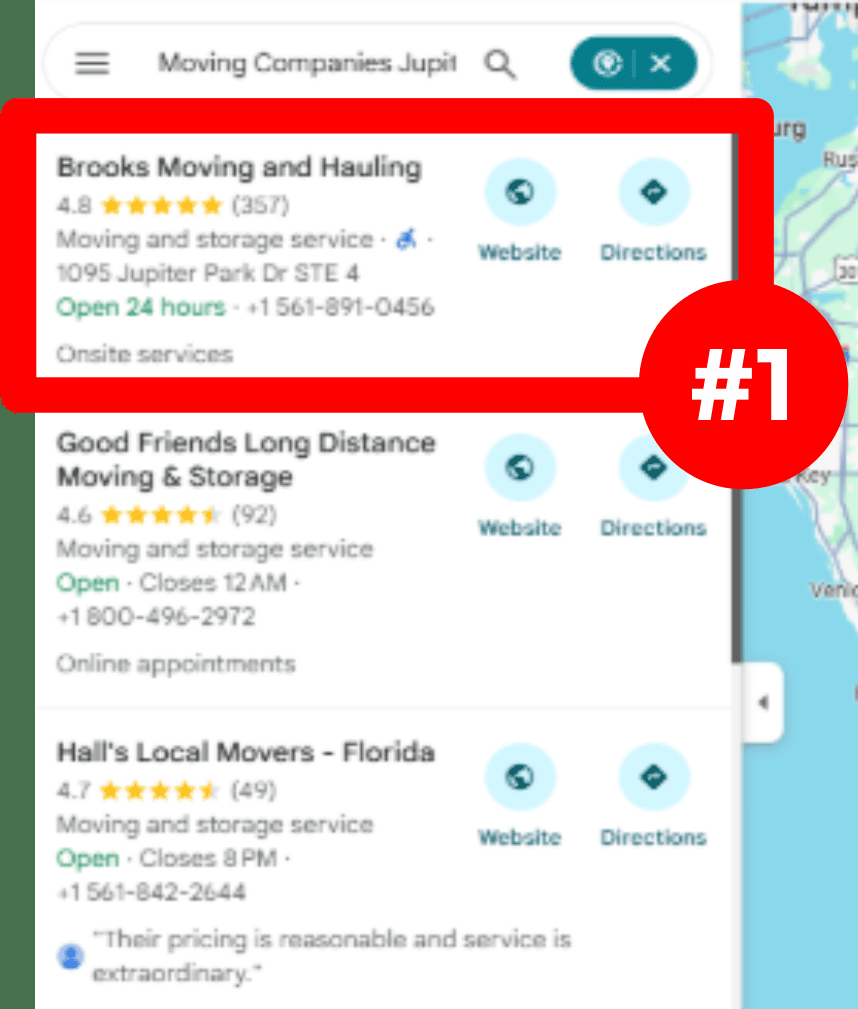
In the top three on Google Maps by day 17.

Google Maps results for movers Jupiter Florida: Brooks Moving and Hauling first, marked #1Google Maps results for moving companies Jupiter: Brooks Moving and Hauling first, marked #1

A local mover against regional chains. Top three on the map by day 17, then top three across a 14-mile radius by day 90. Both crops show Brooks first in the list.

Top 3 on the map

Day 17

Top 3 radius by day 90

14 miles

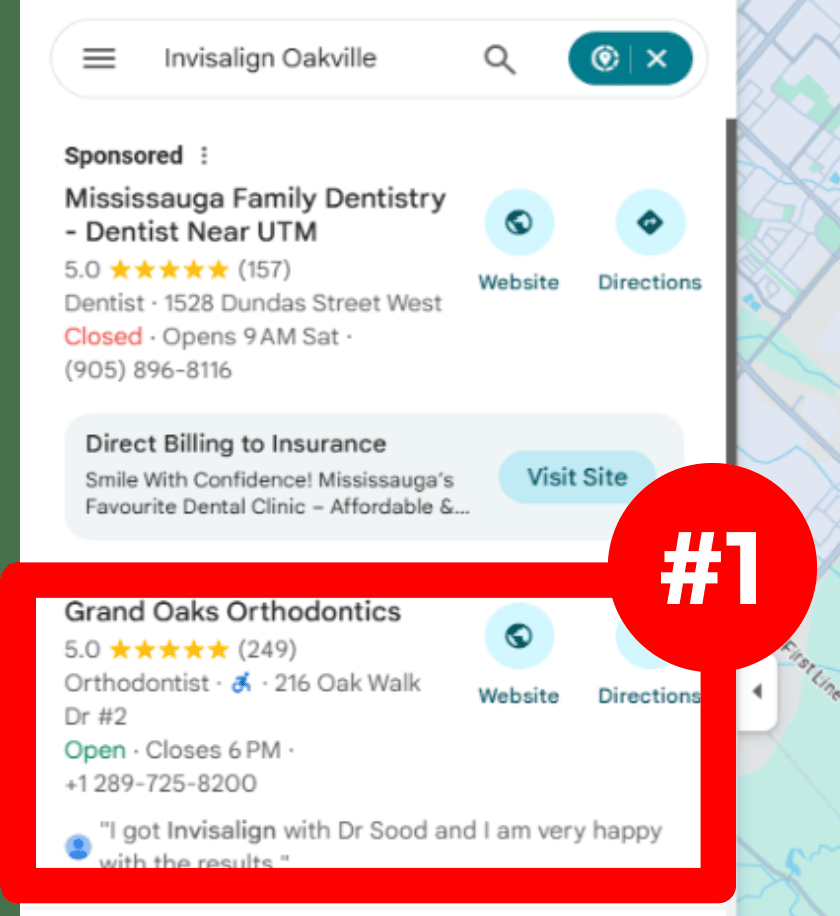
Google Maps results for Invisalign Oakville: one sponsored dentist, then Grand Oaks Orthodontics first with 5.0 stars from 249 reviews, marked #1

Grand Oaks Orthodontics · Oakville, Ontario

First for “Invisalign Oakville” as well as “braces Oakville”.

Two of the searches that matter most to an orthodontist, and the same profile sits first below the ad on both. One profile can rank for many searches when every service it offers is listed in the words patients use. That is step 4 of the guide below.

Read the Grand Oaks case study →

More stories: 360 Hazardous Cleanup · American Hurricane Shutters · Go Pro Plumbing, Heating & Air · Shoreside Therapies · R.A. Woodall Roofing

We run profiles like these for plumbers, HVAC, roofers, dentists, law firms, med spas, plastic surgeons, movers, cleaning companies, and other trades and practices.

(03) What Google reads

Your profile is a form. Google grades every box.

Google says local results are mainly based on three things: how well you match the search, how far you are from the person searching, and how well known you are. Your profile feeds the first and the third. Here’s where.

An illustration. Made-up business.
  1. 1

    Name

    Your real business name, nothing added. Google’s rules ban stuffing towns or services into it, and break that rule and the profile can be suspended.

  2. 2

    Category and service area

    The category tells Google what you do before it reads anything else. You get one main category and up to 9 more, and up to 20 service areas if you go to your customers.

  3. 3

    Reviews and your replies

    One visible piece of how well known you are. What customers write, and how you answer, is read by people and by Google.

  4. 4

    Hours

    Wrong hours cost calls. Holiday hours too.

  5. 5

    Photos and videos

    Real jobs, real vans, real people. The first thing a customer judges you on.

  6. 6

    Services and products

    Every job you do, listed in the words customers search with, where your category allows it.

  7. 7

    Description

    Up to 750 characters on who you are and what you do. No links and no sales offers, or Google can take it down.

(04) The free guide

How to optimize your Google Business Profile, step by step.

Optimizing your Google Business Profile means filling in every part of it completely and truthfully, then keeping it active, so Google can match you to more searches and customers have a reason to pick you. Here is the whole method we use, free, in 16 steps. Every rule is checked against Google’s own help pages this week. Do it yourself, or have us do it every week.

Part one · Set it up right

  1. Step 01

    Claim and verify your profile

    Search Google for your business name. If a profile already exists, choose to claim it; if not, create one at Google Business Profile. Nothing else on this list counts until Google has verified that you run the business, because an unverified profile can’t reply to reviews or be trusted with edits.

    Google picks which ways you can verify, based on your type of business, where you are and your hours. If video is offered, use it: Google recommends it. Film one unbroken clip of at least 30 seconds, on your phone, showing your signage, your tools or stock, and proof you can get into the premises or the van.

    Do this

    • ✓Have the business email and phone to hand
    • ✓Pick video when it’s offered
    • ✓Wait up to 5 business days before trying again

    Source: Google Business Profile Help, Verify your business, checked 17 October 2026.

    Ways Google may offer to verify you

    Video Recommended
    Phone or text
    Email
    Live video call
    Postcard
    Instant, in some cases

    30s

    shortest video

    5

    business days to review

    14

    days for most postcards

    How verification looks. Options vary by business.
  2. Step 02

    Use your real business name, and nothing else

    The name field is for the name on your signage, vans and paperwork. Google’s rules ban adding taglines, services, towns, phone numbers or all-caps words to it, and say a stuffed name can get the profile suspended.

    It’s the most common shortcut we see, because it can work for a few weeks. Then someone reports it, Google renames the profile or suspends it, and every review and photo goes dark with it. If your legal name already includes a service, like “Riverside Plumbing”, that’s fine: it’s your real name.

    Do this

    • ✓Match the name to your sign and registration
    • ✓Remove any town, service or slogan you added

    Source: Google Business Profile Help, Guidelines for representing your business, checked 17 October 2026.

    Business name

    ×Riverside Plumbing | Best 24/7 Emergency Plumber Riverside CA

    A tagline, a service and a town added to the name: Google can suspend the profile for this.

    ✓Riverside Plumbing

    The name on the van, the sign and the paperwork.

    An illustration. Made-up business.
  3. Step 03

    Pick the right categories

    The category tells Google what you are before it reads anything else, so it decides which searches you can show up for. You choose one main category and up to 9 more, and whatever sits in the first field is the main one.

    Make the main category the job you most want calls for. Then add extra ones only where they are true: a plumber who also installs water heaters can add that, a plumber who doesn’t should not. Google asks you not to pick a category for every product or service. Those belong in the services list in step 4. Look at the businesses ranked above you for ideas you missed.

    Do this

    • ✓Main category = your best-paying job
    • ✓Add true extras only, up to 9
    • ✓Check what the top three use

    Source: Google Business Profile Help, Edit your Business Profile, checked 17 October 2026.

    Categories: 1 main + up to 9 more

    Main: PlumberWater heater installation serviceDrainage serviceGas installation serviceExtra 4Extra 5Extra 6Extra 7Extra 8Extra 9

    Fill extra slots only with categories that are true. Empty is better than wrong.

    An illustration. Made-up business.
  4. Step 04

    List every service, in your customers’ words

    The services list is where you spell out every job you do. Google suggests some based on your category; add your own for the rest. Each one is another way to match a search, which is how Grand Oaks Orthodontics ranks first for both “braces” and “Invisalign”.

    Use the words a customer would type, not the words on a brochure: “burst pipe repair”, not “comprehensive plumbing solutions”. Google asks for no prices, phone numbers or personal details in custom service names, so keep each one to the plain name of the job and add a line of description where it helps.

    Do this

    • ✓One line per job you want calls for
    • ✓Plain names, no prices or numbers
    • ✓Add a short description to the big ones

    Source: Google Business Profile Help, Add or edit services, checked 17 October 2026.

    Services

    Burst pipe repairSame-day
    Tankless water heater installationGas and electric
    Sewer line camera inspectionWith video
    Plumbing solutions $99 call 555-0100

    No prices or phone numbers in service names.

    An illustration. Made-up business.
  5. Step 05

    Set your address or your service areas

    If customers come to you, show your real street address. If you go to them, like most trades, hide the address and set service areas instead. Google allows up to 20, as cities or postcodes, and says the area generally shouldn’t reach past about two hours’ drive from your base.

    Google’s rules say a P.O. box or a remote mailbox isn’t acceptable, and a virtual office you don’t work from isn’t eligible at all. Being closer to the person searching helps you rank, and nobody can move their shop, so the honest setup plus everything else on this list is how businesses like American Hurricane Shutters win searches 52 miles out.

    Do this

    • ✓Customers visit you: show the address
    • ✓You visit them: hide it, add up to 20 areas
    • ✓Never use a mailbox or virtual office

    Source: Google Business Profile Help, Manage your service areas, checked 17 October 2026.

    You
    ~2 hours’ drive
    RiversideCoronaNorcoJurupa ValleyMoreno ValleyPerrisEastvaleRubidoux+ up to 12 more

    Address hidden. Up to 20 service areas, as cities or postcodes.

    An illustration. Made-up business.
  6. Step 06

    Write a description that sounds like you

    You get up to 750 characters to say who you are, what you do and where. Google’s rules: no links of any kind, and no copy that focuses on sales, prices or special offers. Break them and the description can be taken down.

    Lead with the jobs you most want, then the areas you cover, then what makes you the safe choice: years in business, licences, written quotes, same-day service. Write it for a customer reading on their phone, not for Google. Offers go in posts (step 9), where they’re allowed.

    Do this

    • ✓Up to 750 characters
    • ✓Jobs first, then areas, then proof
    • ✓No links, no prices, no sale offers

    Source: Google Business Profile Help, Guidelines for representing your business, checked 17 October 2026.

    From the business

    Family-run plumbers in Riverside since 2009. We fix leaks, blocked drains and broken water heaters the same day, and install tankless heaters, water softeners and new gas lines. Licensed and insured, with upfront written quotes. Our vans cover Riverside, Corona, Norco and Jurupa Valley, 24 hours a day...

    610 of 750 charactersNo links. No sale offers.
    An illustration. Made-up business.
  7. Step 07

    Keep your hours, holiday hours and more hours right

    Wrong hours lose calls, and they also invite a stranger to suggest new ones (step 14). Set your regular hours, then add special hours for holidays. Google suggests confirming holiday hours even when they match your normal ones, so customers know you checked.

    Special hours are for short changes of up to 6 days in a row. For a closure of 7 days or more, mark the business temporarily closed. If you offer something on a different schedule, like 24-hour emergency calls, add it under more hours.

    Do this

    • ✓Regular hours for every day
    • ✓Holiday hours before each holiday
    • ✓Emergency or delivery times under more hours

    Source: Google Business Profile Help, Set holiday and special hours, checked 17 October 2026.

    Hours

    Mon to Fri7:00 AM to 7:00 PM
    Saturday8:00 AM to 4:00 PM
    SundayClosed
    ThanksgivingClosed Holiday hours
    Dec 248:00 AM to 12:00 PM Holiday hours

    Closed 7 days or more? Mark the business temporarily closed instead.

    An illustration. Made-up business.

Part two

Keep it working. The weekly part.

Steps 1 to 7 are done once and checked now and then. Steps 8 to 16 never stop, and they’re where most profiles fall behind the three businesses above them.

  1. Step 08

    Add real photos and videos, every week

    Photos are what customers judge you on first: your vans, your team, your finished jobs, your shop front. Use real ones. Stock photos look like every other listing and tell a customer nothing.

    Google’s photo rules: JPG or PNG, between 10 KB and 5 MB, at least 250 by 250 pixels, and 720 by 720 is the size Google recommends. Videos can be up to 30 seconds and 75 MB, at 720p or better. A few new pictures every week from real jobs keeps the profile looking alive and gives Google fresh proof you’re open and working.

    Do this

    • ✓Logo, cover, team, vans, finished jobs
    • ✓3 to 5 new job photos a week
    • ✓Focused, well lit, no filters or heavy edits

    Source: Google Business Profile Help, Photo and video guidelines, checked 17 October 2026.

    Format

    JPG or PNG

    File size

    10 KB to 5 MB

    Best size

    720 × 720 px

    Smallest

    250 × 250 px

    Video length

    Up to 30 seconds

    Video file

    Up to 75 MB, 720p+

    An illustration. Made-up business.
  2. Step 09

    Post updates and offers, without contact details in the text

    Posts are short updates on your profile: news, an offer, an event. Google archives a post after six months unless you give it a date range, so a profile nobody posts on slowly goes quiet.

    Here’s what changed this autumn. Since late September 2026 Google says it may remove posts with contact details it can’t verify, and it names phone numbers, email addresses and social media handles. Leave them out of the text and add the Call now button, which uses the number on your verified profile.

    Do this

    • ✓One post a week: a job, a tip or an offer
    • ✓Date ranges on offers and events
    • ✓No phone numbers, emails or handles in the text: use the Call now button

    Source: Google Business Profile Help, About posts on your Business Profile, checked 17 October 2026.

    Reported by Search Engine Roundtable, 25 September 2026.

    Update · Riverside Plumbing

    Water heater acting up as it gets cold? We replaced 14 heaters across Riverside last month. Same-day installs this week.

    Call Mike on 555-0100 or DM @riversideplumb

    Call now

    Contact details typed into the post can get it removed. The Call now button uses your verified number.

    An illustration. Made-up business.
  3. Step 10

    Ask every customer for a review, and reply to all of them

    Google gives you a review link and a QR code to share. Put the same one on every invoice, text and follow-up email, and ask every customer the same way. Google bans paying or discounting for reviews, and it bans asking only the customers you expect to be happy.

    Reply to every review once your profile is verified, the bad ones most of all: a calm, specific answer to a 3-star review wins more trust than ten thank-yous. Reviews are one signal Google weighs, and the easiest for a customer to see. The 360 Hazardous Cleanup result above, first with 1 review over a business with 76, is the reason we never treat them as the whole job.

    Do this

    • ✓One review link or QR code, for every customer
    • ✓No rewards for reviews, no picking who to ask
    • ✓Reply to every review within a few days

    Source: Google Maps user contributed content policy, Fake engagement, checked 17 October 2026.

    Review us on Google

    The same link or code, on every invoice, for every customer.

    ★★★☆☆

    “Fixed the leak but showed up two hours late.”

    Owner’s reply: Sorry about the wait, Sam. Our 9 AM job ran over and we should have called. Next visit is on us.

    An illustration. Made-up business.
  4. Step 11

    Fill in every attribute that applies to you

    Attributes are the small facts customers filter by: wheelchair access, payment types, online estimates, women-owned, veteran-owned, small business. Which ones you see depends on your category and country.

    Tick every one that is true. Some attributes are filled in from what customers report after a visit, so check them now and then, and fix any that are wrong. They also feed the answers Google’s AI gives about you (step 13).

    Do this

    • ✓Open the attributes list and tick every true one
    • ✓Check customer-added attributes every month

    Source: Google Business Profile Help, Edit attributes, checked 17 October 2026.

    Attributes

    ✓ Wheelchair-accessible entrance✓ Women-owned✓ Veteran-owned✓ Small business✓ Accepts credit cards✓ Online estimates✓ Onsite services

    The ones on offer depend on your category and country.

    An illustration. Made-up business.
  5. Step 12

    Add your products, if you sell them

    If you sell or install things, the product editor lets you add each one with a photo, a name, a category and a description, and they show on your profile in Google Search.

    Products have to follow Google’s shopping ads rules, and a breach can get every product you uploaded removed. Keep it to real items with your own photos, and never anything restricted, like weapons or certain health products. Service businesses can still use it for packages, such as a water heater install.

    Do this

    • ✓Your 5 to 10 best sellers or packages
    • ✓Your own photos, plain names

    Source: Google Business Profile Help, Manage products, checked 17 October 2026.

    Tankless heater install

    Water softener

    Drain camera inspection

    Each product gets a photo, a name, a category and a short description.

    An illustration. Made-up business.
  6. Step 13

    Know what replaced the questions box

    The public questions and answers box is gone from Google Maps. Google confirmed in December 2025 that it was removing it, and in its place people tap an Ask button and get an answer written by Google’s AI from what it knows about your business. You can still answer existing questions inside your profile, and Google says those answers help it respond to people asking similar things.

    There is no button to correct a wrong AI answer, so the fix is upstream: make sure your services, areas, hours, attributes and website all say the same, true things. That’s the same work as steps 3 to 11, which is why a complete profile matters more now than it did a year ago.

    Do this

    • ✓Answer any questions still waiting in your profile
    • ✓Make services, areas and hours match your website

    Sources: Search Engine Roundtable, 15 December 2025; BrightLocal, updated April 2026. Checked 17 October 2026.

    Do they install tankless water heaters in Corona?

    Yes. Riverside Plumbing lists tankless water heater installation as a service and serves Corona.

    Services list
    Service areas
    Your website

    Where the answer comes from: what your profile and your site already say.

    An illustration. Made-up business.
  7. Step 14

    Watch for suggested edits, and answer within 4 days

    Anyone can suggest a change to your profile: your hours, your address, your website, even your category. Google tells you, and you have 4 days to accept or reject it. If you don’t answer, Google may publish the change on its own if public information seems to back it up.

    Most suggestions are honest mistakes. Some come from competitors. Either way, check every notice the day it arrives. Your name, address and phone number should also read the same on your website and on the big directories, so Google has less reason to believe a wrong suggestion.

    Do this

    • ✓Turn on profile notifications
    • ✓Answer every suggested edit the same day
    • ✓Same name, address and phone everywhere

    Source: Google Business Profile Help, Review edits to your profile, checked 17 October 2026.

    Suggested edit: hours

    Open 24 hours → Closes 5 PM

    Day 1
    Day 2
    Day 3
    Day 4

    No answer by day 4, and Google may publish it.

    An illustration. Made-up business.
  8. Step 15

    Read your Performance report every month

    Inside your profile, Performance shows what the listing did for you: calls, messages, bookings, direction requests, website clicks, and the searches people used to find you. Only the ones that apply to your business appear, and the searches figure updates at the start of each month.

    Read calls, directions and website clicks against the month before. Those are people who wanted to buy. If views climb and calls don’t, the photos, reviews or hours are losing the customer at the last step.

    Do this

    • ✓Note calls, directions and clicks each month
    • ✓Compare with the month before, not the day before

    Source: Google Business Profile Help, Performance metrics, checked 17 October 2026.

    Calls

    Directions

    Website clicks

    SearchesViewsMessagesBookings
    An illustration. Example numbers.
  9. Step 16

    If your profile is suspended, appeal once and do it properly

    Google suspends profiles that break its guidelines, and a stuffed business name is the reason it names outright. If yours goes, fix the cause first, then use Google’s appeals tool. You get one appeal, so send it with proof: a business registration, a licence, a tax certificate or a utility bill.

    Don’t open a second profile for the same business while you wait. Google says not to, and it makes the case harder. Our article on what to do if your Google Business Profile is suspended walks through the appeal step by step.

    Do this

    • ✓Fix the rule you broke before appealing
    • ✓Attach registration, licence, tax or utility proof
    • ✓One profile per real business

    Source: Google Business Profile Help, Appeal a suspended profile, checked 17 October 2026.

    1. 1Fix what broke the rules
    2. 2Gather proof: registration, licence, tax certificate, utility bill
    3. 3Appeal once, through Google’s appeals tool

    × Don’t open a new profile for the same business.

    The appeal path, in order.

(05) What we do

Set up once. Worked every week.

Claiming the profile takes ten minutes. Keeping it ahead of the three businesses above you is the job. We do all of it for you. You keep running the business.

  1. 01

    Check your profile against the three on top

    We look at your profile box by box next to the businesses Google shows first for your main searches: their categories, their services, their photos, how often they post and how they handle reviews. That tells us exactly what to fix first.

    You4 of 9 boxes done
    Top result8 of 9
    Second result7 of 9

    An illustration of the side-by-side check.

  2. 02

    Fix the foundations

    The right main category and the extra ones that fit, your real name, your address or service areas set the way Google’s rules ask, hours and holiday hours, and the attributes that apply to you, like wheelchair access or women-owned.

    Main category✓ Extra categories✓ Service areas✓ Hours✓ Holiday hours✓ Attributes✓ Booking link
  3. 03

    Write it in your customers’ words

    Your services, your products and your description, written the way people actually search. “Burst pipe repair”, not “comprehensive plumbing solutions”.

    Comprehensive plumbing solutions

    Burst pipe repair

    Water heater replacement

    An illustration.

  4. 04

    New photos and posts, every week

    Real job photos and short updates and offers that keep the profile alive. Posts follow Google’s current rules: since September 2026 Google has been taking down posts that carry phone numbers, emails or social handles it can’t check, so we keep those out.

    Wk 1Wk 2Wk 3Wk 4PhotosPhotosPhotosPhotosUpdateOfferUpdateJob story

    An illustration of a month on the profile.

  5. 05

    A steady habit of reviews, and a reply to every one

    We set up a simple way to ask every customer, not just the happy ones, and we reply to every review, good and bad. Google bans paying for reviews or only asking people you know will be kind. Reviews are one signal among many and the easiest one to see, so we build them alongside everything else, never instead of it.

    ★★★★★

    “Came out the same day and fixed it in an hour.”

    Owner’s reply: Thanks Dana. Glad the water heater’s sorted before the cold snap.

    An illustration.

  6. 06

    Ready for Google’s AI answers

    Google has been replacing the public questions box on Maps with AI answers built from what it knows about your business. A complete, accurate profile is what those answers read, so we make sure it says the right things about your prices, your areas and your hours.

    Does Riverside Plumbing do emergency call-outs on Sundays?

    Yes. They’re open 24 hours and serve Riverside and 9 nearby towns.

    An illustration. Made-up business.

  7. 07

    Guard it

    Anyone can suggest changes to your profile, and Google can apply them. You get 4 days to reject a wrong one. We watch for those, for spam reviews, and for your name, address and phone being different on other directories, which confuses Google about who you are.

    Suggested edit

    Hours: Open 24 hours → Closes 5 PM

    RejectedDay 1 of 4

    An illustration.

  8. 08

    Show you the movement, every month

    Every month you get a report by email: where you rank for each search, how many people found you, and the work we did.

    Searches where you’re in the top three, month by month.

    An illustration of what the report tracks.

(06) The profile is the base

A perfect profile still needs a reason to be trusted.

The profile tells Google what you do. How well known you are is built across the web too. That’s why we work on both.

Layer 1 · This page

Your Google Business Profile

Categories, services, photos, posts, reviews and replies. What Google shows and reads first.

Layer 2

Your website

A page for each service and each area, so the link on your profile lands somewhere that backs it up. Part of our local SEO services.

Layer 3

Mentions across the web

Listings, local news, suppliers and other websites that name you. They’re how Google learns you’re a business people know.

(07) One part of the plan

Your profile is one channel. We run all five.

Awkward Media is a full-service SEO agency: organic, national, ecommerce, local and AI search. Most clients start with Google Maps, because that’s where the phone rings fastest. The same work then pays off in the normal results and the AI answers too.

01

Organic SEO

The normal Google results, under the ads and the map.

Your website ranking for the searches that bring paying customers, with one strong page for each service and the trust Google needs to put it on page one.

02

National SEO

Customers in every state or province, not one town.

One site that has to beat national brands and directories everywhere at once, without a nearby address to lean on. CarSoup is that kind of work.

03

Ecommerce SEO

Product and category pages that sell from search.

Online stores ranking for the products people buy, on Shopify and other platforms.

Pricing

Google Maps starts at $1,497 a month. Google rankings start at $2,697 a month.

Both go up for multiple locations, multiple websites and complexity. Start with Google Maps or the normal Google results, or run both.

How pricing works →

(08) What we won’t do

No tricks. A suspended profile ranks nowhere.

Google’s rules ban every shortcut on this list. A profile that breaks them can be suspended and drop off the map completely.

The shortcuts

  • ×Services or town names stuffed into your business name
  • ×Paying or giving discounts for reviews
  • ×Only asking the customers you know are happy
  • ×A mailbox or virtual office posing as a location
  • ×A second profile for the same business
  • ×Links and sales offers crammed into the description

What we do instead

  • ✓Your real name, and categories and services that say what you do
  • ✓A simple ask after every job
  • ✓Every customer gets the same ask, good day or bad
  • ✓One honest profile at your real address or service area
  • ✓One profile per real location
  • ✓A plain description, and offers where Google allows them: in posts

Already suspended? What to do if your Google Business Profile is suspended. Reviews disappearing? Why Google removes reviews.

(09) Start tonight

Check your profile. Tonight.

No web person needed. Short on time? Start with these, then work through the 16 steps above. Do them whether you hire us or not.

  1. 1

    Look at yourself like a customer

    1. 1. On your phone, search Google for what you do plus your town.
    2. 2. Find your listing on the map, or note that you’re not there.
    3. 3. Open the top result and yours side by side.
    4. 4. Count who has more photos, more recent reviews and more replies.
  2. 2

    Fix the quick ones

    1. 1. Sign in to the Google account that owns your profile, then search your business name on Google. Your profile’s edit tools show up at the top.
    2. 2. Check your main category is the job you most want calls for.
    3. 3. Check your hours, and add holiday hours.
    4. 4. Reply to every review you haven’t answered yet.
  3. 3

    Get the full 90-day plan

    Our free guide to getting your Google Business Profile into the top 3 on Google Maps walks you through the rest, step by step.

    Open the GBP top 3 guide →

(10) Before you sign

Five questions for anyone who touches your profile.

If an agency won’t answer these plainly before the call, keep looking. Here are ours.

Can I see profiles you’ve moved up?

Yes. Sanjay Grover MD went from #17 to first on Google Maps for “best plastic surgery near me” in 20 days. The screenshots are above. More case studies

Will any of this put my profile at risk?

No. We work inside Google’s rules for business profiles. Every shortcut in the list above is off the table, because a suspended profile ranks nowhere.

What will it cost me each month?

Google Maps starts at $1,497 a month. Google rankings start at $2,697 a month. Both go up for multiple locations, multiple websites and complexity. See pricing

How long am I locked in?

Zero months. It’s month to month.

What happens if it doesn’t work?

No visible improvement in 20 days: your payment for that period back, plus $200. Your qualifying keywords not on page one of Google in 60 days: we keep working for free until they are. The guarantee

(11) Is this for you?

We turn clients away. On purpose.

Under $20k a month? We’re not your agency. Over it, and ready to be the first business people find? Let’s talk.

Who it’s for

$20k+

a month in your own revenue. This is for established businesses already doing $20k a month or more.

Spots this month

Very limited

spots left for the month of October. We put a cap on clients we can take in to keep our promises.

What it costs

$1,497+

a month for Google Maps. Higher for multiple locations, websites and complexity. No contracts. Month to month.
See how pricing works →

Google Business Profile optimization guarantees

We put our fee on the line. Page one for your qualifying keywords on Google in 60 days, or we keep working for free. We confirm which ones qualify on the strategy call.

Guarantee 01

20days

If you don’t see visible improvement in your key metrics within the first 20 days, we refund $200 on top of returning your payment for that period.

What we measure: your traffic, what that traffic is worth, how much authority your site and its pages carry, and how many other sites link to you, against the day we start.

Guarantee 02

60days

If your qualifying keywords aren’t on the first page of Google within 60 days, we keep working for free until they are.

What counts: at least one high-value search for your business on page one of Google.

No long-term contracts. Results keep you here. Paperwork doesn't.

Your next step

See your profile next to the top three.

On a free 30 minute call we put your profile next to the three businesses Google shows first for your main searches, and show you what it takes to pass them.

Bring with you

Your websiteYour main serviceTowns you serveCompetitors you see
  1. 01

    We search your market live

    The way your customers do, in the towns you serve.

  2. 02

    We show who's above you, and why

    On Google, on Maps and in the AI answers.

  3. 03

    You leave with a road map

    Yours to keep. If we can help, we'll invite you to work with us.

For established businesses doing at least $20,000 a month.

Questions

Google Business Profile optimization, answered.

What business owners ask us before they book.

Book my free strategy call
01

What is Google Business Profile optimization?

Making every part of your Google Business Profile complete, accurate and active. That’s the listing that shows your name, stars, photos, hours and call button on Google Search and Maps. A well-kept profile lets Google match you to more searches, and gives customers a reason to pick you.

02

How do I optimize my Google Business Profile?

Pick the main category that matches the job you most want calls for, plus up to 9 more that fit. Use your real business name. Set your hours, holiday hours and service areas. List your services in the words customers search with. Write a description of up to 750 characters with no links. Add real photos every week, post updates, ask every customer for a review and reply to all of them. The 16-step guide above walks through each one.

03

How do I increase my Google Business Profile’s views and calls?

Complete every part of it, then keep it active: true categories, every service listed, your service areas set, real photos and a post every week, and a reply to every review. Back it up with a page on your website for each service and area. Then check the Performance report each month for calls, direction requests and website clicks. To reach the towns around you as well, that’s our map pack expansion service.

04

What is Google search engine optimization?

It’s the work of getting your business shown higher when people search on Google, without paying for each click. It covers three places on the page: the normal list of websites, the map with three businesses on it, and the AI answer that often sits at the top. Your Google Business Profile does most of the work on the map. Your website does most of it in the normal list. We do both, plus AI search: see our SEO services.

05

How does Google optimization work?

Google ranks results by how well each one matches the search, and for local businesses also by how close it is to the person searching and how well known it is. Optimizing means making your profile and website match the words your customers use, then building the things Google reads as trust: links from other websites, listings, reviews, photos and steady activity. Ads are separate. They sit above, marked Sponsored, and stop the day you stop paying.

06

What decides where I rank on Google Maps?

Google says local results are mainly based on three things: how well you match the search, how far you are from the person searching, and how well known your business is. Your profile feeds the first directly. How well known you are is built from many signals: links, listings, mentions, your website and reviews among them. Distance you can’t change.

07

Do reviews decide where I rank?

No single thing does. Reviews are one signal, and the easiest one to see. On Google Maps, 360 Hazardous Cleanup ranks first for blood cleanup services with 1 review, above a business with 76. We build reviews alongside everything else, never instead of it.

08

How often should I update my profile?

Every week. New photos of real jobs, and posts with updates or offers. Google archives a post after six months unless it has a date range, so a profile that isn’t touched slowly goes quiet.

09

How long does it take to work?

We guarantee it. If you don’t see visible improvement in your key metrics within the first 20 days, we refund $200 on top of returning your payment for that period. If your qualifying keywords aren’t on the first page of Google within 60 days, we keep working for free until they are.

10

Can I do it myself?

Yes, and the 16 free steps on this page are a good start. The setup is the easy part. What takes the time is keeping it active every week, guarding it against wrong edits and spam, and building the trust around it that moves you up.

11

What if my profile gets suspended?

Google can suspend a profile that breaks its rules, for example extra words stuffed into the business name or a fake address. We don’t do any of that. If yours is already suspended, our article on Google Business Profile suspensions walks through the appeal.

12

Do you work with businesses that have more than one location?

Yes. Each real location gets its own profile, and the price goes up for multiple locations. See multi-location SEO.

13

Do you work in Canada and the USA?

Yes. We work with businesses across both countries. See the cities we work in.

14

How much does Google Business Profile optimization cost?

Google Maps starts at $1,497 a month. Google rankings start at $2,697 a month. Both go up for multiple locations, multiple websites and complexity.